<?xml version="1.0" encoding="utf-8"?><feed xmlns="http://www.w3.org/2005/Atom" ><generator uri="https://jekyllrb.com/" version="4.0.1">Jekyll</generator><link href="https://itcamefromtheinternet.com/blog/feed.xml" rel="self" type="application/atom+xml" /><link href="https://itcamefromtheinternet.com/blog/" rel="alternate" type="text/html" /><updated>2024-04-05T13:51:08-04:00</updated><id>https://itcamefromtheinternet.com/blog/feed.xml</id><title type="html">It Came From the Internet!</title><subtitle>ICFTI focuses on exciting, useful, and obscure tech and software, found randomly throughout the interwebs</subtitle><entry><title type="html">How To: Bypass Roku’s New Forced Terms of Service</title><link href="https://itcamefromtheinternet.com/blog/how-to-bypass-roku-terms-of-service/" rel="alternate" type="text/html" title="How To: Bypass Roku’s New Forced Terms of Service" /><published>2024-03-17T00:00:00-04:00</published><updated>2024-03-17T00:00:00-04:00</updated><id>https://itcamefromtheinternet.com/blog/roku-terms-bypass</id><content type="html" xml:base="https://itcamefromtheinternet.com/blog/how-to-bypass-roku-terms-of-service/"><![CDATA[<h2 id="intro">Intro</h2>

<p>Roku has been getting a lot of criticism lately because of some recent drama.
First,
they exposed many users’ accounts to hackers,
who proceeded to make purchases with their credit card info.
Then,
Roku doubled down on their blunder
by requiring all users to agree to an arbitration agreement.
Essentially,
the goal is for Roku to protect themselves
from getting sued by users who lost money from the company’s negligence.</p>

<aside>
This is part of the reason we at ICFTI
prefer solutions such as a using a dumb TV plus Jellyfin.
</aside>
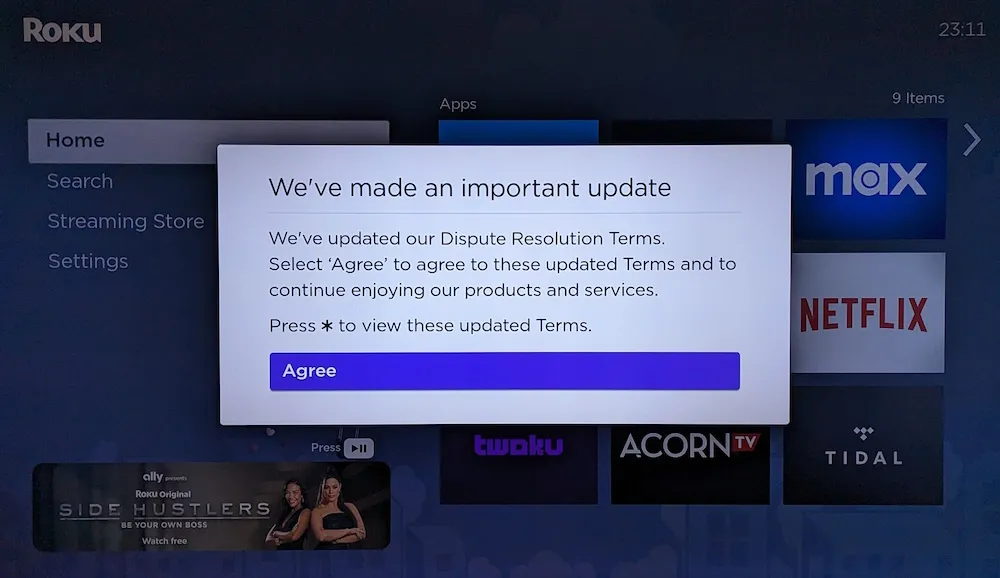
<p>The problem is,
users only have the option to agree or….
nothing.
That’s the only choice.
If you don’t agree,
Roku <strong>completely locks you out of the TV</strong>
that you should already own.
And it’s not just limited to the smart apps,
You can’t even access any of the setting menus,
or use HDMI-connected devices!</p>

<p><img src="/blog/assets/images/posts/roku/roku_forced-agreement.webp" alt="Roku Forced Agreement" /></p>

<p>Fortunately,
we’ve discovered a way to bypass the Roku forced agreement,
and regain access to your TV again.
It is critical to perform these actions ASAP.
It currently works,
and will continue to work once enabled.
However, if you wait,
an update may be released from Roku,
which prevents using the bypass if not already enabled.</p>

<p>The three main steps in this process are to
completely power off your Roku TV,
disconnect it from the internet,
and permanently block it from reaching the Roku servers.
The main idea of the solution is to cut off the internet from your TV.
If the Roku TV can’t reach Roku’s servers,
it can’t display the agreement message.
Even if you select “Agree”,
that agreement will never actually make it back to Roku.</p>

<h2 id="1-completely-power-off-your-roku-tvs">1. Completely Power Off Your Roku TV(s)</h2>

<p>First,
turn off and unplug your TV.
This will prevent Roku from pushing any additional updates to your TV,
that might render it even more unusable.</p>

<aside>
For those of us who are paranoid and distrusting of most modern tech companies,
it begs the question:
What else is the TV doing while it appears off,
but is really still on?
</aside>
<p>Just pressing the power button doesn’t work,
since some portion of information remains in memory
even when you think the TV is off.
We discovered that once the agreement message was displayed,
it will stay in memory until the TV is FULLY powered off.</p>

<h2 id="2-disconnect-from-the-network">2. Disconnect From the Network</h2>

<p>The easiest method is to unplug any LAN cables to your TV,
and turn off your WiFi,
or just unplug your router entirely, cutting you off from the internet.
At this point you can plug the TV back in to the power outlet,
and turn it back on.
If all goes right,
you should no longer see the message demanding your agreement.</p>

<h2 id="3-permanently-disable-rokus-internet-connection">3. Permanently Disable Roku’s Internet Connection</h2>

<p>Great! You did it!
You can now use your Roku TV as a dumb TV,
and have full access to all the settings.
But… now you have no internet to the rest of your devices.
And if you re-enable the internet,
the arbitration message will come back.</p>

<p>Now that we have access to the settings of the TV again,
the next step is to erase it’s WiFi connection details from
<code class="highlighter-rouge">Settings</code> &gt; <code class="highlighter-rouge">System</code> &gt; <code class="highlighter-rouge">Advanced system settings</code> &gt; <code class="highlighter-rouge">Network Connection reset</code>.</p>

<p>For added protection,
you can also completely block the TV’s MAC address.
This is an identifier that is permanent and unique only to your TV,
and distinguishes it from any other device on your network.</p>

<aside>
This may be easier to accomplish if your router has parental control settings.
</aside>
<p>Your MAC address can be found at
<code class="highlighter-rouge">Settings</code> &gt; <code class="highlighter-rouge">System</code> &gt; <code class="highlighter-rouge">About</code>.
Next enter your router configuration
and set a static IP address for your Roku’s MAC.
We cannot give exact instructions for this,
as every router’s configuration method is different.
Once a static IP is set,
set up firewall rules to block the TV from accessing the internet.</p>

<p>After you’ve blocked only your Roku’s internet connection,
you can re-enable the internet for the rest of your devices.</p>

<h2 id="4-optional-regain-access-to-your-media-apps">4. (Optional) Regain Access to Your Media Apps</h2>

<p>Now that your Roku TV is a dumb TV,
you may wonder how to watch your favorite streaming services and smart apps.
Here are some options:</p>

<ol>
  <li>Use HDMI to connect a device such as
 a laptop, Raspberry Pi, or other computer,
 and use it’s internet connection and web browser.</li>
  <li>Use HDMI to connect a video game console such as
 a Playstation 5,
 which has many of the same apps as Roku.</li>
  <li>Add another firewall rule
 that allows the Roku TV to access only a local Jellyfin or Plex server.</li>
</ol>

<h2 id="conclusion">Conclusion</h2>

<p>Because your Roku TV no longer has internet access,
it acts more like a “dumb” TV,
using only eternally connected media devices.
The benefit of this,
is that you’re not held hostage by Roku’s arbitration agreement.</p>]]></content><author><name>Isaac Phillips</name></author><category term="how to" /><category term="howto" /><category term="roku" /><category term="tech" /><category term="tv" /><summary type="html"><![CDATA[Intro Roku has been getting a lot of criticism lately because of some recent drama. First, they exposed many users’ accounts to hackers, who proceeded to make purchases with their credit card info. Then, Roku doubled down on their blunder by requiring all users to agree to an arbitration agreement. Essentially, the goal is for Roku to protect themselves from getting sued by users who lost money from the company’s negligence. This is part of the reason we at ICFTI prefer solutions such as a using a dumb TV plus Jellyfin. The problem is, users only have the option to agree or…. nothing. That’s the only choice. If you don’t agree, Roku completely locks you out of the TV that you should already own. And it’s not just limited to the smart apps, You can’t even access any of the setting menus, or use HDMI-connected devices! Fortunately, we’ve discovered a way to bypass the Roku forced agreement, and regain access to your TV again. It is critical to perform these actions ASAP. It currently works, and will continue to work once enabled. However, if you wait, an update may be released from Roku, which prevents using the bypass if not already enabled. The three main steps in this process are to completely power off your Roku TV, disconnect it from the internet, and permanently block it from reaching the Roku servers. The main idea of the solution is to cut off the internet from your TV. If the Roku TV can’t reach Roku’s servers, it can’t display the agreement message. Even if you select “Agree”, that agreement will never actually make it back to Roku. 1. Completely Power Off Your Roku TV(s) First, turn off and unplug your TV. This will prevent Roku from pushing any additional updates to your TV, that might render it even more unusable. For those of us who are paranoid and distrusting of most modern tech companies, it begs the question: What else is the TV doing while it appears off, but is really still on? Just pressing the power button doesn’t work, since some portion of information remains in memory even when you think the TV is off. We discovered that once the agreement message was displayed, it will stay in memory until the TV is FULLY powered off. 2. Disconnect From the Network The easiest method is to unplug any LAN cables to your TV, and turn off your WiFi, or just unplug your router entirely, cutting you off from the internet. At this point you can plug the TV back in to the power outlet, and turn it back on. If all goes right, you should no longer see the message demanding your agreement. 3. Permanently Disable Roku’s Internet Connection Great! You did it! You can now use your Roku TV as a dumb TV, and have full access to all the settings. But… now you have no internet to the rest of your devices. And if you re-enable the internet, the arbitration message will come back. Now that we have access to the settings of the TV again, the next step is to erase it’s WiFi connection details from Settings &gt; System &gt; Advanced system settings &gt; Network Connection reset. For added protection, you can also completely block the TV’s MAC address. This is an identifier that is permanent and unique only to your TV, and distinguishes it from any other device on your network. This may be easier to accomplish if your router has parental control settings. Your MAC address can be found at Settings &gt; System &gt; About. Next enter your router configuration and set a static IP address for your Roku’s MAC. We cannot give exact instructions for this, as every router’s configuration method is different. Once a static IP is set, set up firewall rules to block the TV from accessing the internet. After you’ve blocked only your Roku’s internet connection, you can re-enable the internet for the rest of your devices. 4. (Optional) Regain Access to Your Media Apps Now that your Roku TV is a dumb TV, you may wonder how to watch your favorite streaming services and smart apps. Here are some options: Use HDMI to connect a device such as a laptop, Raspberry Pi, or other computer, and use it’s internet connection and web browser. Use HDMI to connect a video game console such as a Playstation 5, which has many of the same apps as Roku. Add another firewall rule that allows the Roku TV to access only a local Jellyfin or Plex server. Conclusion Because your Roku TV no longer has internet access, it acts more like a “dumb” TV, using only eternally connected media devices. The benefit of this, is that you’re not held hostage by Roku’s arbitration agreement.]]></summary><media:thumbnail xmlns:media="http://search.yahoo.com/mrss/" url="https://itcamefromtheinternet.com/blog/assets/images/posts/roku/RokuLogo.jpg" /><media:content medium="image" url="https://itcamefromtheinternet.com/blog/assets/images/posts/roku/RokuLogo.jpg" xmlns:media="http://search.yahoo.com/mrss/" /></entry><entry><title type="html">Make Firefox Open PDF Instead of Downloading</title><link href="https://itcamefromtheinternet.com/blog/firefox-open-pdf-instead-of-downloading/" rel="alternate" type="text/html" title="Make Firefox Open PDF Instead of Downloading" /><published>2023-12-31T00:00:00-05:00</published><updated>2023-12-31T00:00:00-05:00</updated><id>https://itcamefromtheinternet.com/blog/firefox-open-pdf</id><content type="html" xml:base="https://itcamefromtheinternet.com/blog/firefox-open-pdf-instead-of-downloading/"><![CDATA[<h2 id="introduction">Introduction</h2>
<p>Are you tired of Firefox automatically downloading every PDF file to your disk
without giving you the option to open it directly?
You’re not alone.
Many users find this default behavior frustrating,
but the good news is that there’s a simple solution.</p>

<p>In this article,
we’ll guide you through the steps
to stop Firefox from automatically downloading PDF files
and instead allow you to open them directly.</p>

<h2 id="understanding-firefoxs-behavior">Understanding Firefox’s Behavior</h2>

<p>Firefox determines what a file is,
based on the <code class="highlighter-rouge">content-type</code> header
it receives from the server hosting the file.
Another crucial header is the <code class="highlighter-rouge">content-disposition</code> header,
which is the server’s suggestion in how the browser should handle the file.
The two primary options for content-disposition are “inline” and “attachment”:</p>

<ul>
  <li>“Inline” is the default behavior, meaning the browser will handle the file according to your browser settings.</li>
  <li>“Attachment” forces the browser to download the file.</li>
</ul>

<p>Because of these settings,
based on what the remote server instructs,
some PDF files may be downloaded automatically,
while others are handled according to your browser settings.
It’s worth noting that if a server sends the PDF with a header of “attachment”,
and Firefox is set to obey it,
this is what causes the download of the PDF.</p>

<aside>
<p>
The PDF will technically still always "download".
This makes sense
because your computer needs to have the file in order to open and read it.
</p>
<p>
The difference is it's downloaded to a temporary location that is periodically emptied,
rather than cluttering your Downloads folder.
</p>
</aside>
<p>Therefore, the solution is to force the PDF to be opened “inline”.</p>

<h2 id="the-solution">The Solution</h2>

<p>To ensure that Firefox opens PDF files instead of downloading them, follow these simple steps:</p>

<h3 id="1-open-aboutconfig">1. Open about:config</h3>
<p>Type “about:config” in the Firefox address bar and press Enter.
Accept the risk and continue to the configuration page.</p>

<h3 id="2-find-the-setting">2. Find the Setting</h3>
<p>In the search bar at the top, type “browser.download.open_pdf_attachments_inline.”</p>

<h3 id="3-change-the-preference">3. Change the Preference</h3>
<p>Double-click on the “browser.download.open_pdf_attachments_inline” preference to toggle it from “false” to “true.”</p>

<p>That’s it! You’ve successfully configured Firefox to open PDF files instead of automatically downloading them.
From here, if you decide you need the file,
you can still download it to a location of your choosing.</p>

<h2 id="conclusion">Conclusion</h2>

<p>By understanding Firefox’s file-handling behavior and making a simple configuration change in the about:config settings, you can take control of how PDF files are handled in your browser. Say goodbye to the frustration of automatic downloads and hello to the convenience of opening PDFs directly. If you’ve ever wondered, “Why is Firefox downloading PDF files?”—now you have the solution.</p>

<p>Remember, this quick guide not only addresses how to stop Firefox from automatically downloading PDF files but also provides insight into the mechanisms behind Firefox’s default behavior. Enjoy a smoother browsing experience by customizing your browser to suit your preferences.</p>

<p>Now you can open PDFs hassle-free and save time by skipping unnecessary downloads.</p>]]></content><author><name>Taikun</name></author><category term="how to" /><category term="firefox" /><category term="foss" /><category term="howto" /><category term="internet" /><category term="software" /><category term="web" /><summary type="html"><![CDATA[Are you tired of Firefox automatically downloading every PDF file to your disk without giving you the option to open it directly? In this article, we'll guide you through the steps to stop Firefox from automatically downloading PDF files and instead allow you to open them directly.]]></summary><media:thumbnail xmlns:media="http://search.yahoo.com/mrss/" url="https://itcamefromtheinternet.com/blog/assets/images/posts/firefox/Logo-1000x550.png" /><media:content medium="image" url="https://itcamefromtheinternet.com/blog/assets/images/posts/firefox/Logo-1000x550.png" xmlns:media="http://search.yahoo.com/mrss/" /></entry><entry><title type="html">Unlocking KeePassXC with Nitrokey</title><link href="https://itcamefromtheinternet.com/blog/keepassxc-nitrokey/" rel="alternate" type="text/html" title="Unlocking KeePassXC with Nitrokey" /><published>2023-09-02T00:00:00-04:00</published><updated>2023-09-02T00:00:00-04:00</updated><id>https://itcamefromtheinternet.com/blog/keepassxc-nitrokey</id><content type="html" xml:base="https://itcamefromtheinternet.com/blog/keepassxc-nitrokey/"><![CDATA[<p>After long wait,
with KeePassXC version 2.7.6, we finally have Nitrokey 3 support!
<!-- more -->
This means we can use a Nitrokey as an easy method
for quickly unlocking a KeePassXC password database.</p>

<p>We can use a Nitrokey in combination with other security methods,
in order to create a stronger lock.
Alternatively, for convenience,
you can use just the Nitrokey by itself.
This would allow us to simply plug in the USB
in order to unlock the password database.</p>

<p>You must be using KeePassXC version 2.7.6 or newer in order to use Nitrokey 3.
We’re using a NitroKey 3A Mini, with firmware version 1.5.0 on Arch Linux.</p>

<p>If you don’t already have a NitroKey,
you can get one at the link below.</p>

<p><a href="https://shop.nitrokey.com/shop?aff_ref=24" class="link-promote" target="_blank" rel="noreferrer"><img src="/blog/assets/images/pay-space/logo_schwarz_rot_transparent.jpg" alt="NitroKey Logo" width="50%" />Click Here</a></p>

<h2 id="configure-nitrokey-for-use-with-keepassxc">Configure Nitrokey for use with KeePassXC</h2>

<p>The first thing you need to do,
is add a challenge-response secret to your Nitrokey.
To do this, you need the <code class="highlighter-rouge">python-pynitrokey</code> package</p>

<p>Next, you need to pick a password that is
<strong>exactly 20 bytes long</strong>.
This can be done by picking a twenty character password,
and running the follow command:</p>
<div class="language-bash highlighter-rouge"><div class="highlight"><pre class="highlight"><code><span class="nv">$ </span>nitropy nk3 secrets add-challenge-response 2 <span class="si">$(</span><span class="nb">echo </span>your-20-byte-secret | <span class="nb">base32</span><span class="si">)</span>

Command line tool to interact with Nitrokey devices 0.4.39
Please <span class="nb">touch </span>the device <span class="k">if </span>it blinks
Done
</code></pre></div></div>
<p>This converts our 20-character secret to base32,
and stores it in slot 2 of our Nitrokey.</p>

<aside>If you have set a pin, it will ask for it during this command</aside>
<p>Use the following command to check that the secrets were added correctly.</p>
<div class="language-bash highlighter-rouge"><div class="highlight"><pre class="highlight"><code><span class="nv">$ </span>nitropy nk3 secrets list

Command line tool to interact with Nitrokey devices 0.4.39
01. HmacSlot2	Hmac/Sha1	
</code></pre></div></div>

<p>The last line shows there is a HMAC/SHA1 secret in slot 2.
This is used for our KeePassXC challenge response.</p>

<p>You can store your 20-byte secret in your KeePassXC database itself,
but it won’t help you if you lose/break your Nitrokey,
since you won’t be able to unlock your database if you forget it.
So make sure it’s something you won’t forget,
or otherwise write it down and keep it somewhere safe.</p>

<p>We can now proceed with using it in KeePassXC.</p>

<h2 id="new-database">New Database</h2>

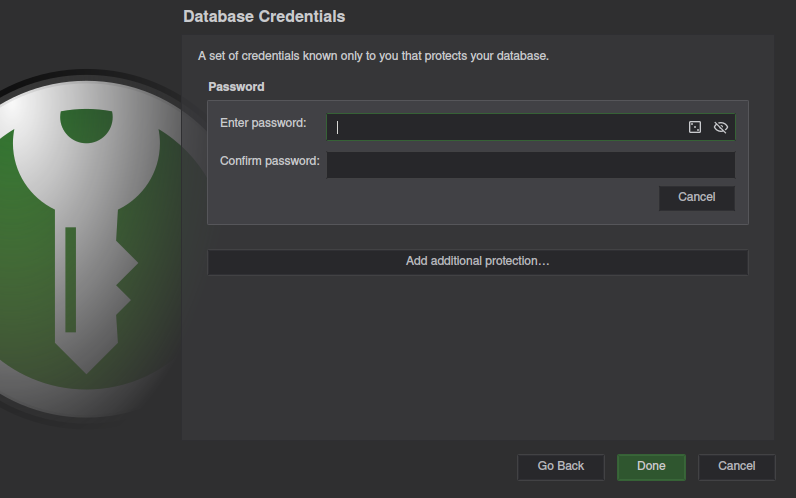
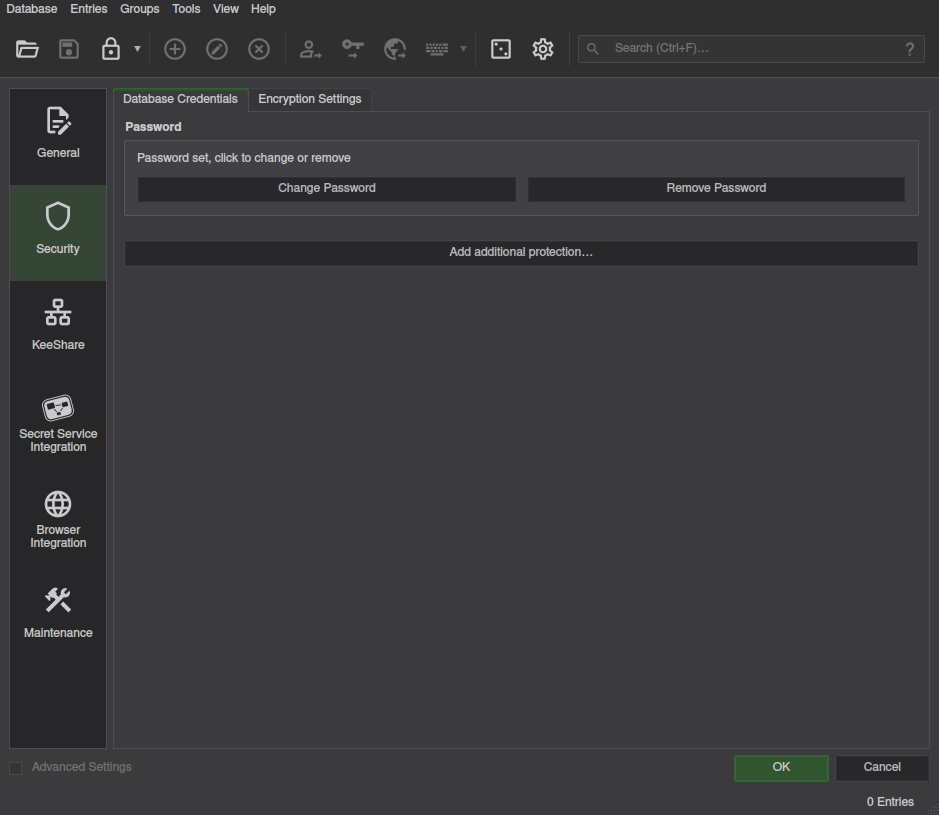
<p>Create a new database as normal.
Once you get to the “Database Credentials” section,
the window will look like the one below.</p>

<p><img src="/blog/assets/images/posts/keepassxc/keepassxc-new-db-password.png" alt="New Database - Password" /></p>

<aside>You can also set a Key File now if desired</aside>
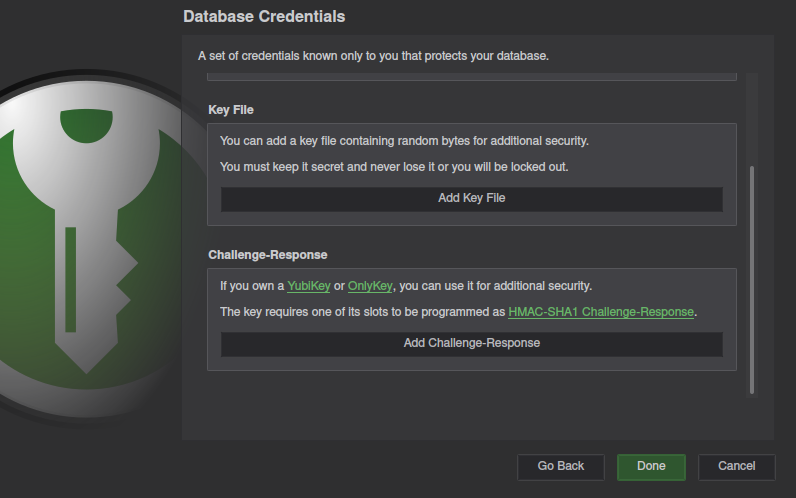
<p>Select <code class="highlighter-rouge">Add additional protection...</code>
and scroll to the bottom to find the <code class="highlighter-rouge">Challenge-Response</code> section.</p>

<p><img src="/blog/assets/images/posts/keepassxc/keepassxc-new-db-challenge-response.png" alt="New Database - Challenge Response Section" /></p>

<p>The UI still only says YubiKey/OnlyKey,
but NitroKey will work.</p>

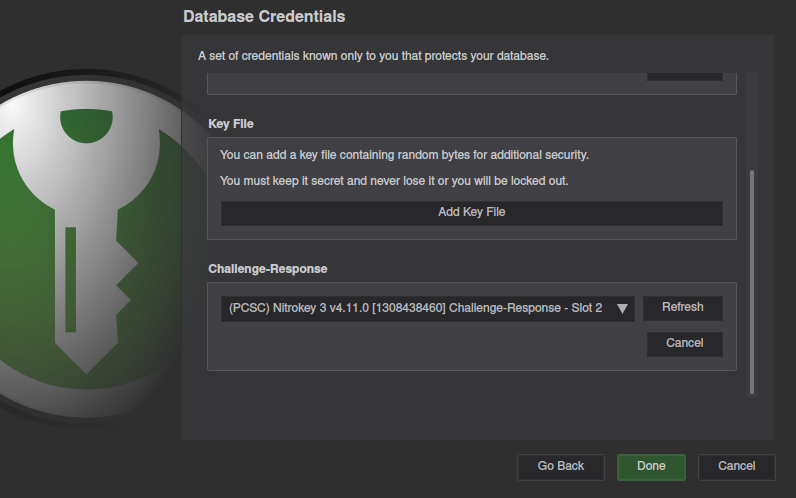
<p>Click <code class="highlighter-rouge">Add Challenge-Response</code>,
and make sure your NitroKey is listed.</p>

<p><img src="/blog/assets/images/posts/keepassxc/keepassxc-new-db-nitrokey.png" alt="New Database - Nitrokey Detected" /></p>

<p>If your key is not listed,
see the <a href="#troubleshooting">troubleshooting</a> section below.</p>

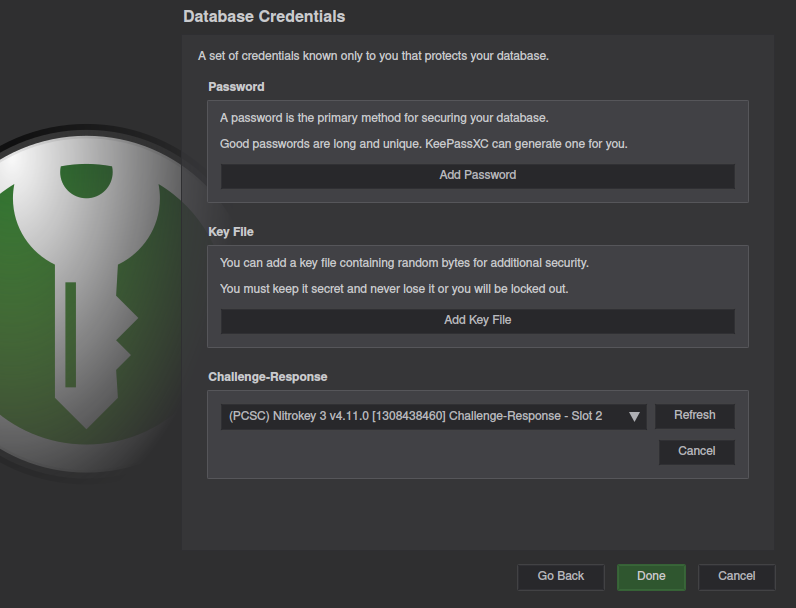
<p>Not recommended,
but you can press the cancel button under the password input,
in order to require only the hardware Nitrokey.</p>

<p><img src="/blog/assets/images/posts/keepassxc/keepassxc-new-db-hw-key-no-password.png" alt="New Database - No Password" /></p>

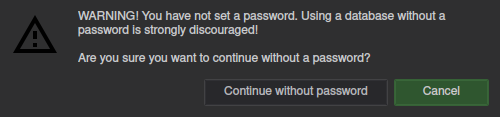
<p><img src="/blog/assets/images/posts/keepassxc/keepassxc-new-db-no-password-confirmation.png" alt="New Database - No Password Confirmation" /></p>

<p>This will result in KeyPassXC confirming
that you really want to proceed without a password.</p>

<p>Before adding passwords to your database,
save it,
lock it,
and confirm you can open it again with your key.</p>

<p>If all goes well
you’re free to fill up the database with all your passwords.</p>

<h2 id="existing-database">Existing Database</h2>

<p>We recommend making a copy of your database.
If something goes wrong and you lock yourself out,
you’ll still have the old copy.
Once you verify the you can unlock the new database with the new method,
you can safely delete the old copy.</p>

<p>For enabling challenge-response on an existing KeePassXC database,
you must first unlock the database using the current unlock method.
The database must be unlocked before changing any of it’s security settings.</p>

<p>Once unlocked,
go to <code class="highlighter-rouge">Database</code> =&gt; <code class="highlighter-rouge">Database Security</code> in the main menu,
to change security settings.</p>

<p><img src="/blog/assets/images/posts/keepassxc/keepassxc-existing-db-security-settings.png" alt="Existing Database - Security Settings" width="75%" /></p>

<p>From here, follow the same steps as in <a href="#new-database">New Database</a>.
After verifying you can unlock your database,
you can delete the old copy without the Nitrokey security.</p>

<h2 id="troubleshooting">Troubleshooting</h2>

<p>If you’re having issues getting this to work,
the problem could be either a misconfigured key,
or a problem with KeePassXC.
Let’s look at some solutions,
from the ground up.</p>

<h3 id="nitrokey">Nitrokey</h3>

<p>If your Nitrokey is not detected by nitropy,
you may need to install the <code class="highlighter-rouge">libfido2</code> package and Nitrokey udev rules
(available on the Nitrokey website).</p>

<p>If you’re having problems with creating the secret on the key,
try the following steps.</p>

<p>If you’re using any Python version (older or newer) than 3.9 or 3.10,
you may get the following Python error while using nitropy:</p>
<div class="highlighter-rouge"><div class="highlight"><pre class="highlight"><code>Critical error:
An unhandled exception occurred
	Exception encountered: AttributeError("module 'semver' has no attribute 'Version'")
</code></pre></div></div>
<aside>The same can be accomplished using the program "pipx"</aside>
<p>If so,
install/run nitropy with Python version 3.9 or 3.10,
or create a python virtual environment,
and running the commands again.</p>

<div class="language-bash highlighter-rouge"><div class="highlight"><pre class="highlight"><code>python3 <span class="nt">-m</span> venv nitrokey-venv
<span class="nb">cd </span>nitrokey-venv
./bin/activate
pip <span class="nb">install </span>pynitrokey
</code></pre></div></div>

<h3 id="keepassxc">KeePassXC</h3>

<p>If KeePassXC doesn’t detect the key,
try these methods.</p>

<p>On Arch Linux we needed the <code class="highlighter-rouge">pcscd</code> service started.
Close all KeePassXC instances,
then run the following command.</p>
<div class="language-bash highlighter-rouge"><div class="highlight"><pre class="highlight"><code><span class="nb">sudo </span>systemctl start pcscd.service
</code></pre></div></div>
<p>Afterwards,
restart KeePassXC,
and the key should be detected.</p>]]></content><author><name>Taikun</name></author><category term="how to" /><category term="foss" /><category term="howto" /><category term="keepassxc" /><category term="nitrokey" /><category term="security" /><summary type="html"><![CDATA[After long wait, with KeePassXC version 2.7.6, we finally have Nitrokey 3 support!]]></summary><media:thumbnail xmlns:media="http://search.yahoo.com/mrss/" url="https://itcamefromtheinternet.com/blog/assets/images/pay-space/logo_schwarz_rot_transparent.jpg" /><media:content medium="image" url="https://itcamefromtheinternet.com/blog/assets/images/pay-space/logo_schwarz_rot_transparent.jpg" xmlns:media="http://search.yahoo.com/mrss/" /></entry><entry><title type="html">Full Nextcloud and Android Synchronization</title><link href="https://itcamefromtheinternet.com/blog/nextcloud-android-sync/" rel="alternate" type="text/html" title="Full Nextcloud and Android Synchronization" /><published>2023-08-31T00:00:00-04:00</published><updated>2023-08-31T00:00:00-04:00</updated><id>https://itcamefromtheinternet.com/blog/nextcloud-android</id><content type="html" xml:base="https://itcamefromtheinternet.com/blog/nextcloud-android-sync/"><![CDATA[<p>Google doesn’t make it easy to use Android without all the Google services.
However, the Nextcloud Android app can be a really great replacement.
So let’s figure out how to get around Android’s limitations,
to access a Nextcloud instance while away from a computer.</p>

<h2 id="file-sync">File Sync</h2>

<p>By installing
the Nextcloud app
on your Android phone or tablet,
you can retrieve files from your
<a href="/blog/nextcloud/">Nextcloud</a>
server at any time.
The problem is, if you make changes to the files on your phone,
they are not automatically sent back to the Nextcloud server.</p>

<p>We already solved this issue by using Syncthing.
For instructions on how to do automatic two-way sync
with a Nextcloud server and Android device,
see our article to enable
<a href="/blog/how-to-setup-nextcloud-syncthing/">Nextcloud and Android folder sync</a>.</p>

<h2 id="the-webdav-problem">The WebDAV Problem</h2>

<p>WebDAV is the protocol used by many services,
including Nextcloud,
for communication of calendar, contacts and tasks.
The problem is, Android does not support WebDAV.
Despite WebDAV being an industry-accepted standard,
Google refuses to add native support to Android.</p>

<p>The Google Calendar app does support the CalDAV and CardDAV extensions of WebDAV,
and Google assumes you’re using your Android device with a Google account.
This is the reason Android itself doesn’t support WebDAV.
Because the app works,
the Android devs have put little priority
on implementing it within the Android operating system itself.</p>

<p>However this requires you to sign into Google,
which you may be trying to avoid by using Nextcloud in the first place.
For those of us who want to use Nextcloud as replacement for Google,
this is a big problem,
but one that can be fixed.
Additionally, if the calendar is already installed on Nextcloud,
having to subscribe to a Nextcloud calendar via Google is redundant.</p>

<p>Because of this WebDAV problem,
a third party app is required
to act as a bridge between the Nextcloud server,
and the Android system.
The nextcloud developers recommend using DAVx5.
DAVx5 is open source,
and if you want it for free,
you could download the source code
from the DAVx5 website and build it yourself,
but the easiest way is to install it using the F-Droid store instead.
However, if you want the ease of downloading DAVx5
from the Google Play Store or Samsung store,
there’s a fee.
This is a good way to support the developers.</p>

<p>If you don’t want to bother with any of that,
other free DAV apps such as Open Sync
are available for free on the Google Play store.
However, we don’t have any experience with these alternate apps.</p>

<h2 id="davx5">DAVx5</h2>

<p>Once DAVx5 is installed,
there are a few ways to set it up,
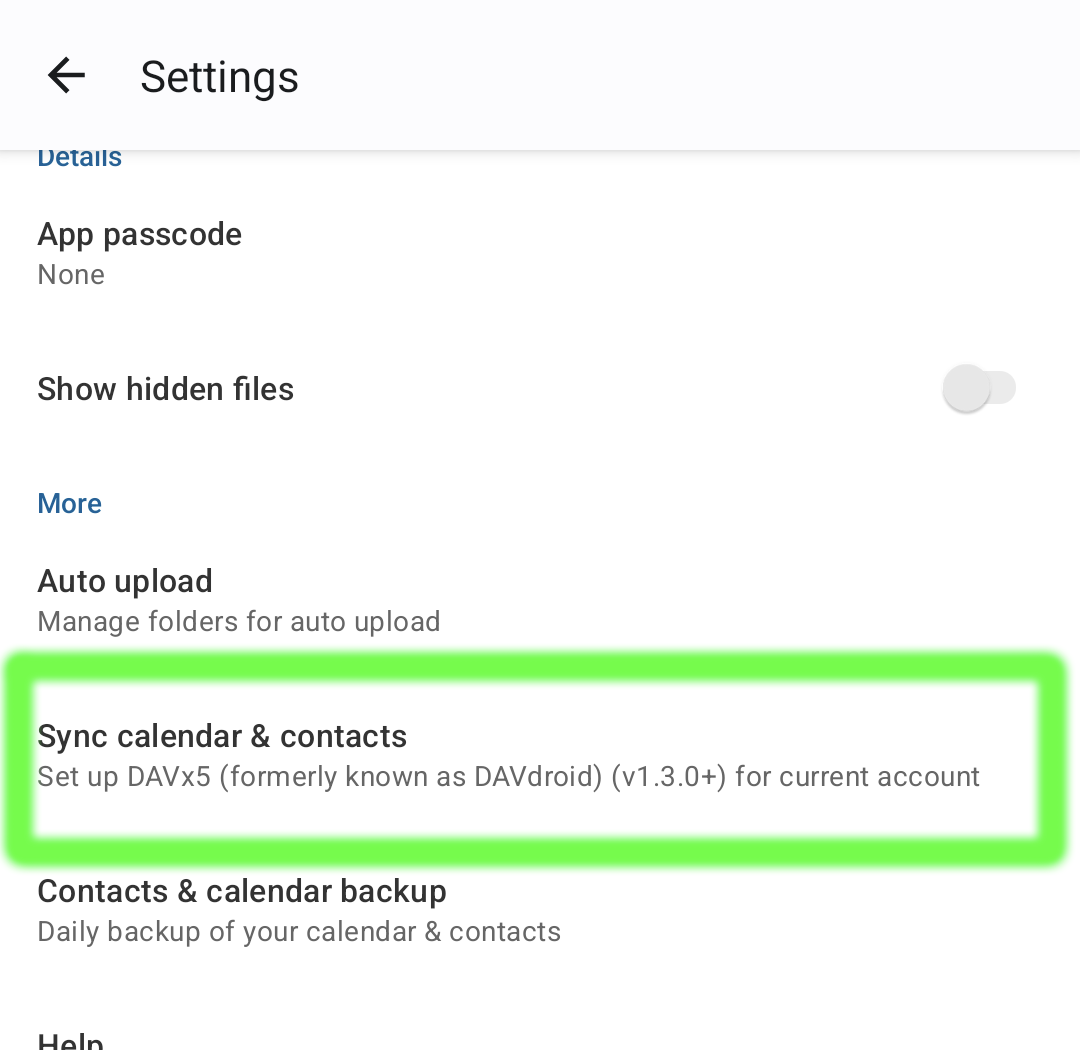
however, the easiest way is actually from within the Nextcloud App.</p>

<p><img src="/blog/assets/images/posts/nextcloud-android/davx5-setup.png" alt="Nextcloud App - DAVx5 Setup" width="45%" /></p>

<p>In the <code class="highlighter-rouge">Settings</code> menu of Nextcloud,
you’ll see the option to setup DAVx5.</p>

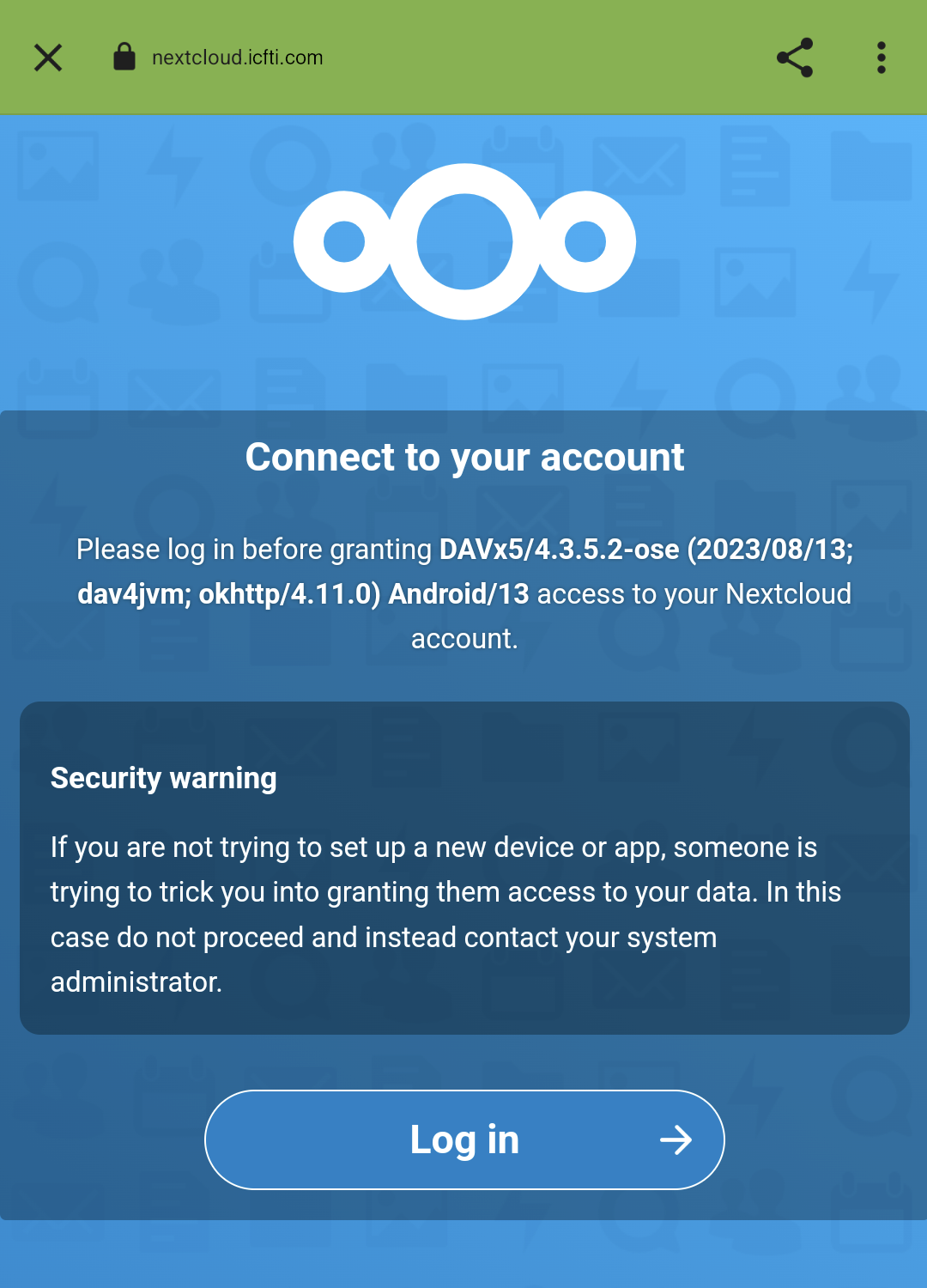
<p><img src="/blog/assets/images/posts/nextcloud-android/davx5-nextcloud-login.png" alt="Nextcloud App - DAVx5 Connected" width="45%" /></p>

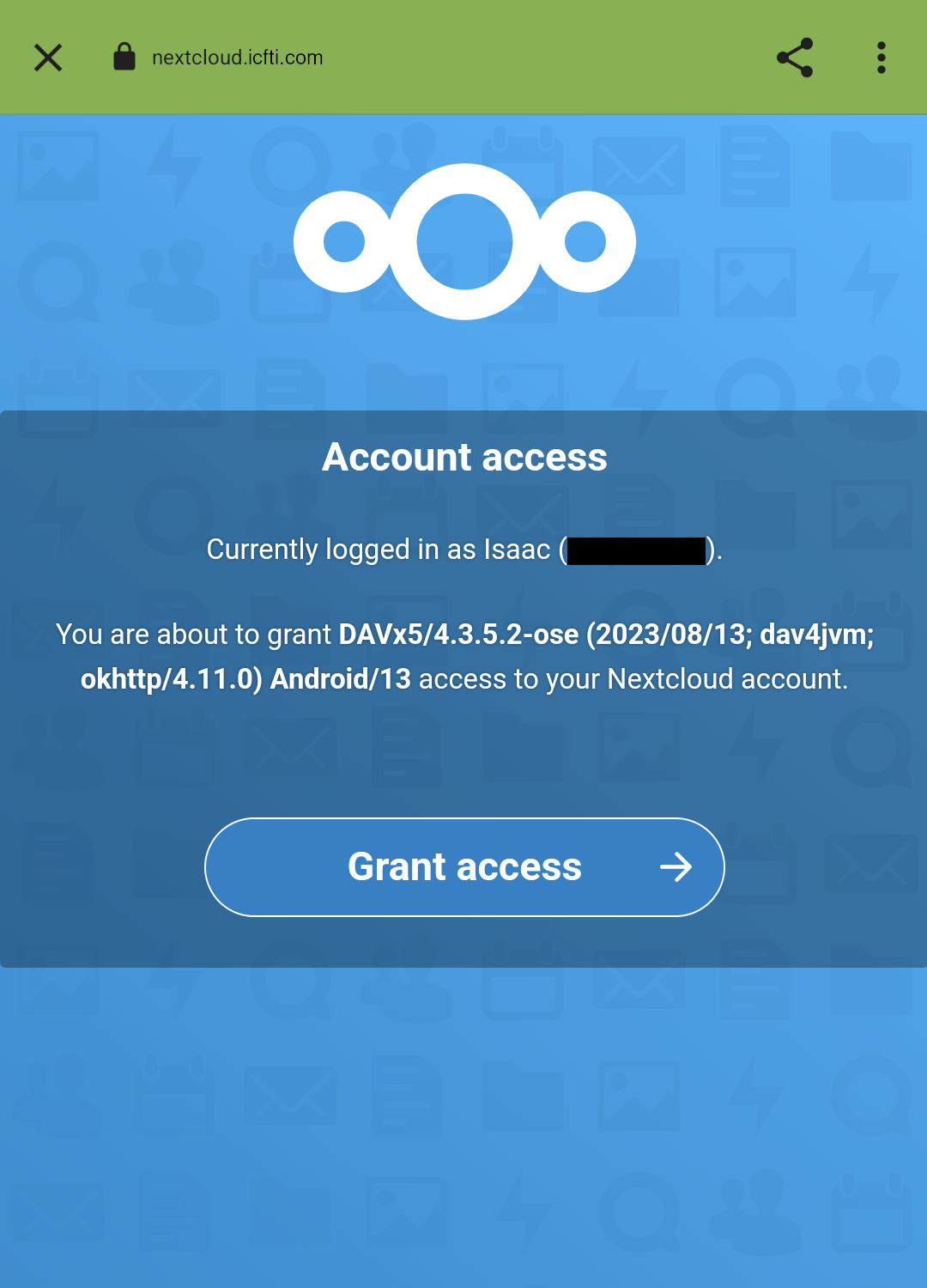
<p>This will open a web browser,
and a page that asks you to log in to your Nextcloud account.
Once logged in,
you can grant DAVx5 access to your Nextcloud account.</p>

<p><img src="/blog/assets/images/posts/nextcloud-android/davx5-grant-access.png" alt="Nextcloud App - Grant DAVx5 Access" width="45%" />
<img src="/blog/assets/images/posts/nextcloud-android/davx5-nextcloud-connected.png" alt="Nextcloud App - DAVx5 Connected" width="45%" /></p>

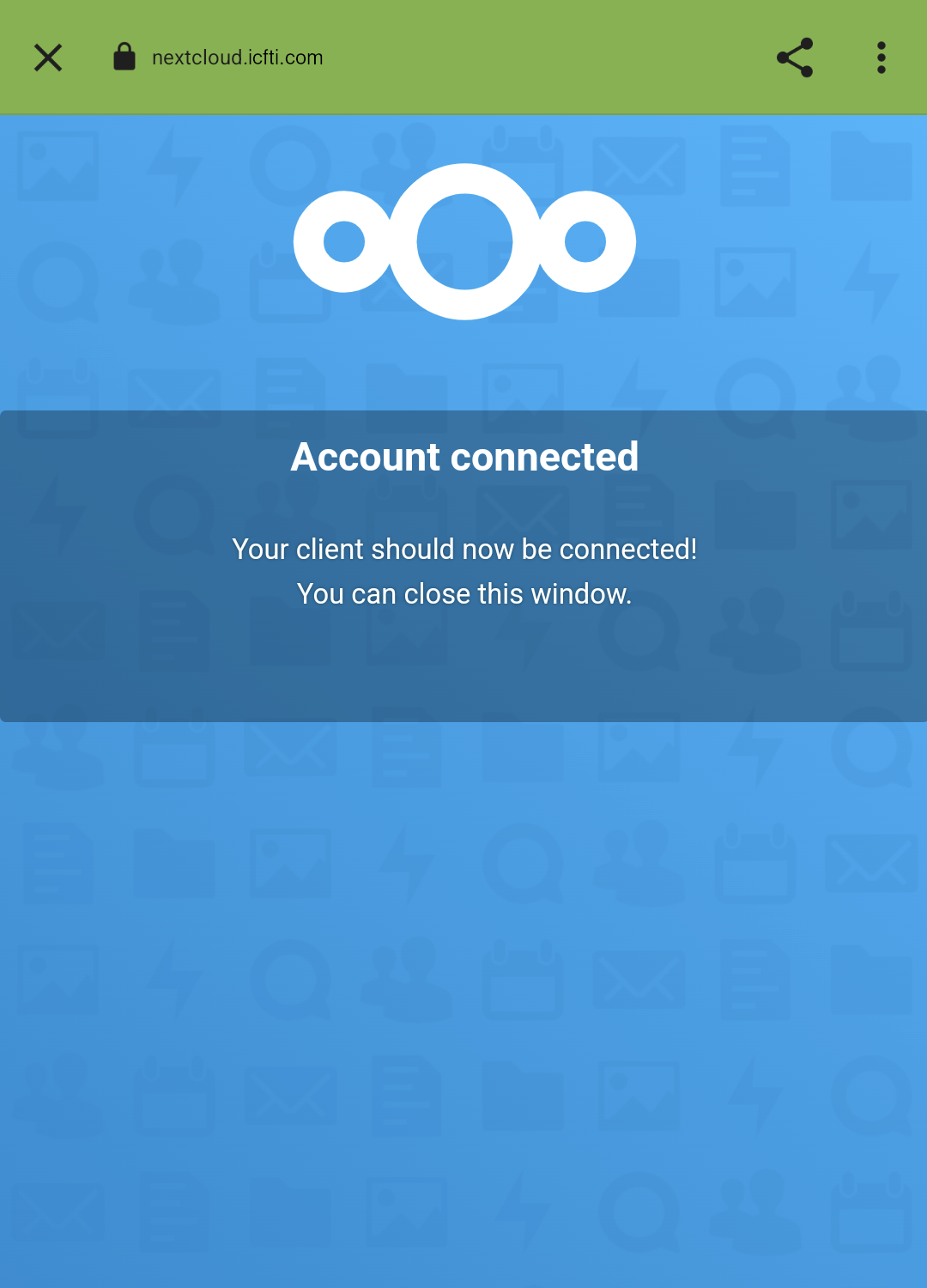
<p>After logging in,
you should see a confirmation that your account is connected.
At which point,
close the web browser.</p>

<p><img src="/blog/assets/images/posts/nextcloud-android/davx5-create-account.png" alt="Nextcloud App - DAVx5 Account" width="45%" /></p>

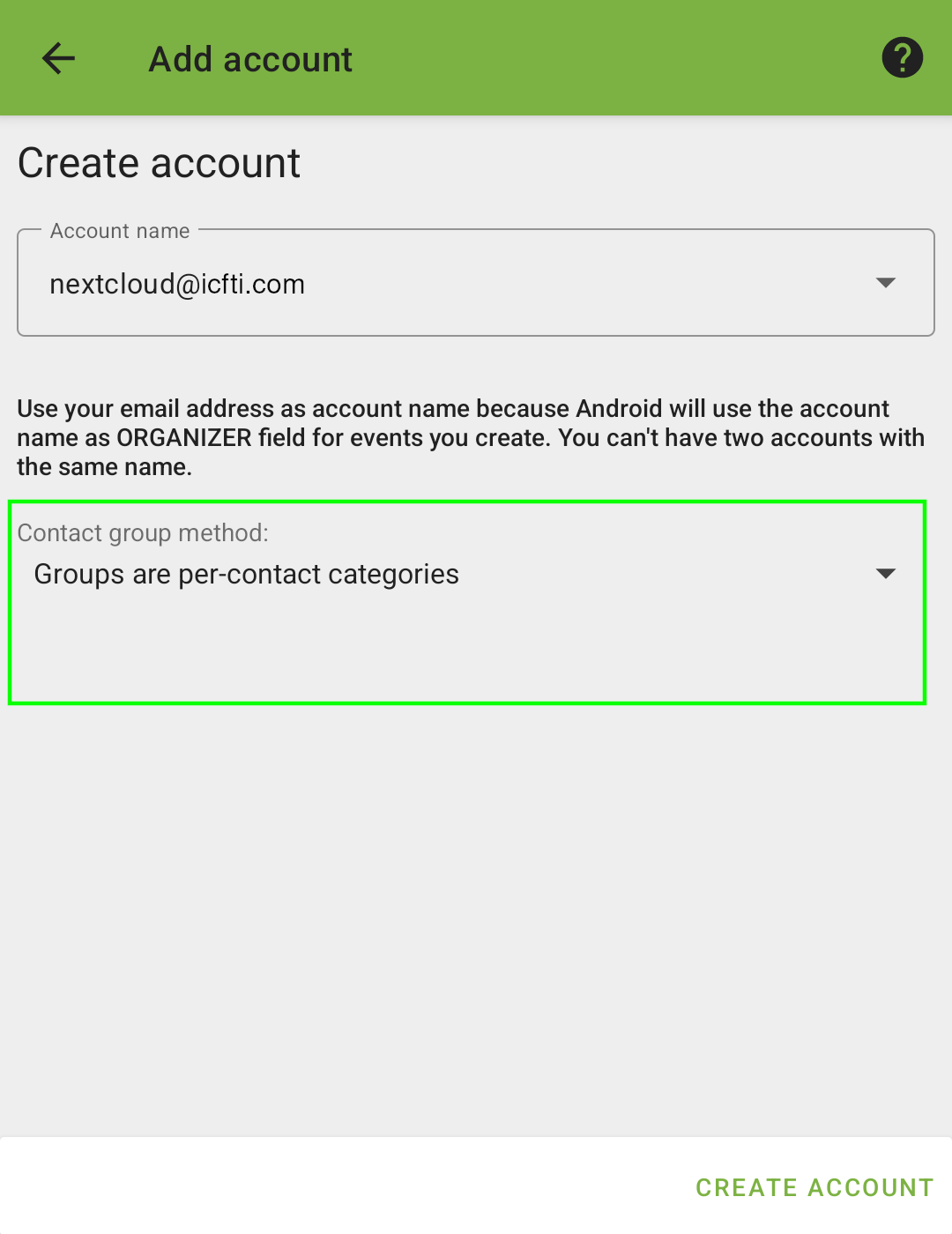
<p>You will then be able to create your account in DAVx5.
Make sure <code class="highlighter-rouge">Contact group method</code> is set to
<strong>Groups are per-contact categories</strong>.</p>

<h2 id="contacts-sync">Contacts Sync</h2>

<p><img src="/blog/assets/images/posts/nextcloud-android/davx5-carddav.png" alt="DAVx5 CardDav" width="45%" /></p>

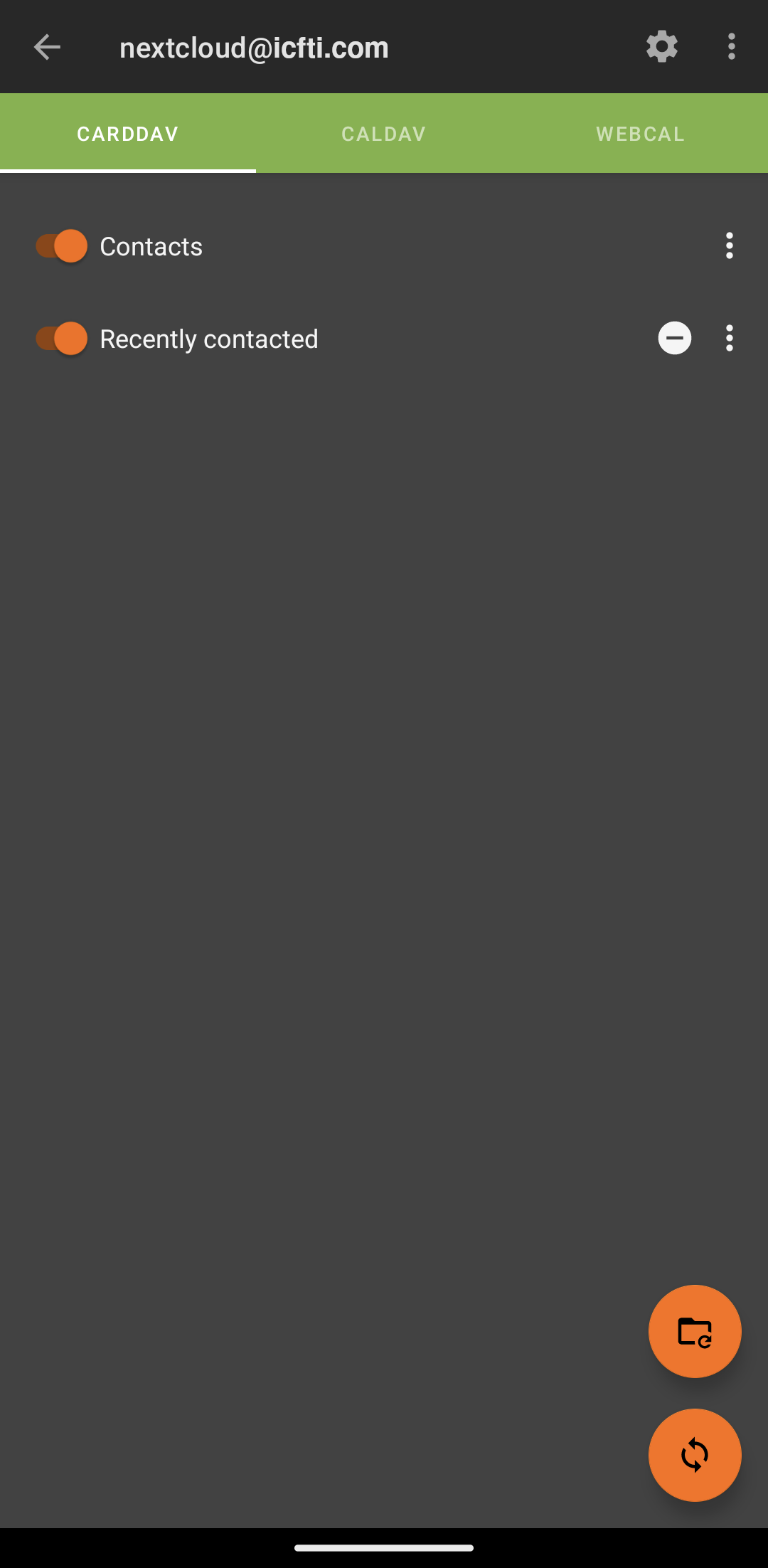
<p>After you’ve <a href="#davx5">set up DAVx5</a>,
enabled the contacts slider, and performed a sync,
your contacts should be made available in your phone’s address book.</p>

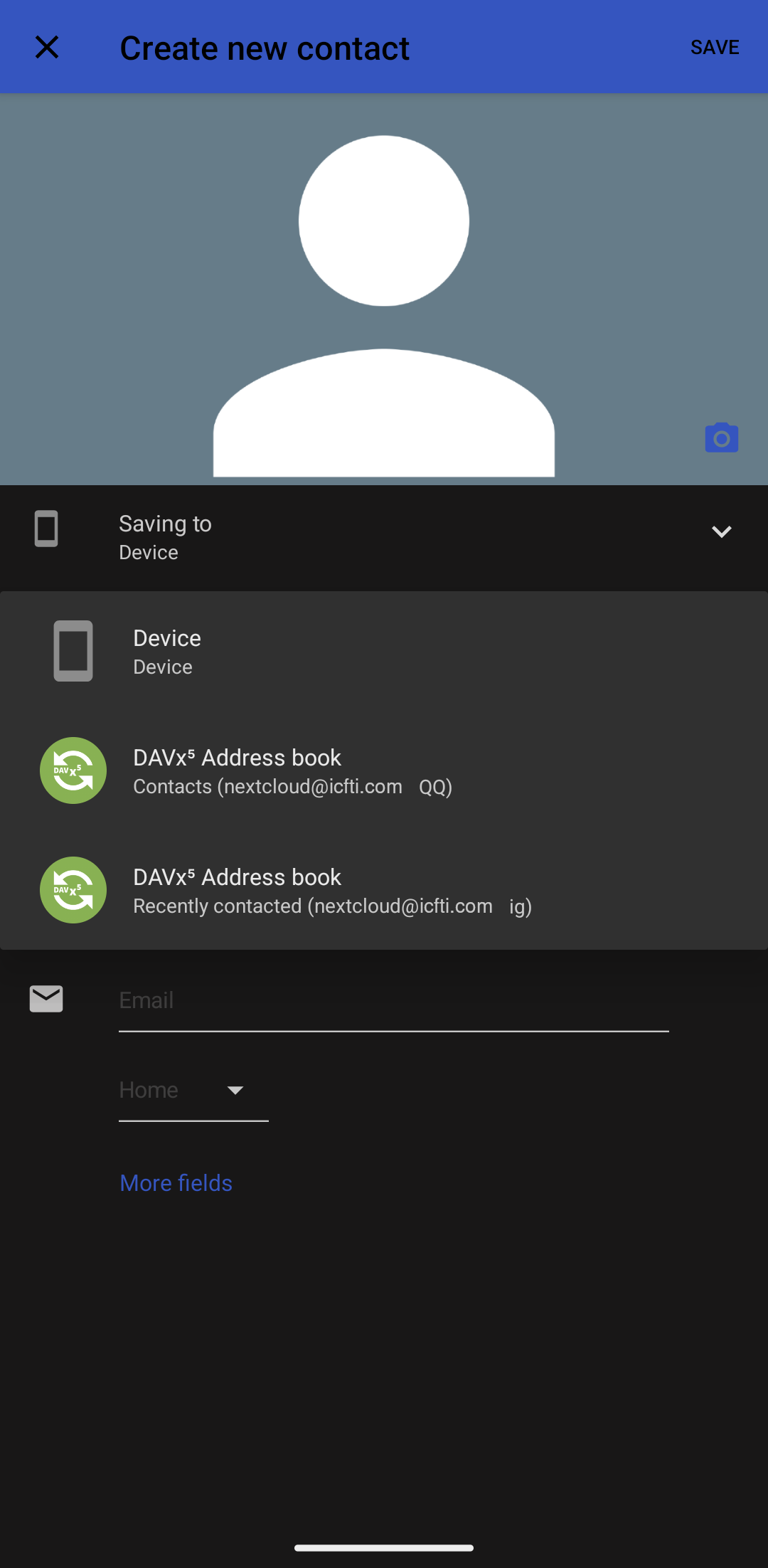
<p><img src="/blog/assets/images/posts/nextcloud-android/save-contact-to-nextcloud.png" alt="Save Contact to Nextcloud" width="45%" /></p>

<p>Now,
whenever you add a new contact,
two potential locations on where to save it will be offered.
Either locally on the device, or up at the Nextcloud server.
Make sure to save it to the Nextcloud account we configured in DAVx5,
rather than the phone itself.</p>

<h2 id="calendar-sync">Calendar Sync</h2>

<p>Nextcloud uses two separate protocols when handling calendars:</p>

<ol>
  <li>
    <p><strong>CalDAV</strong> is used for Nextcloud’s own calendars.
 They are editable both on the Nextcloud server,
 as well as on Android.</p>
  </li>
  <li>
    <p><strong>WebCAL</strong> for calendars that are hosted by other services,
 but subscribed to with Nextcloud.
 This includes <code class="highlighter-rouge">.ics</code> files.
 For instance if you use Nextcloud to subscribe to your
 work or school calendars.
 These are read-only.</p>
  </li>
</ol>

<p>Once <a href="#davx5">DAVx5</a> is set up,
our contacts and CalDAV calendars are now synced,
and we have links to all our WebCAL calendars.</p>

<aside>
  <p>You’ve probably seen iCalendar files,
also known as iCal.
They typically end in extension <code class="highlighter-rouge">.ics</code>, or sometimes <code class="highlighter-rouge">.ical</code>.</p>
</aside>

<p>However,
Android itself does not support iCal files,
the file format transferred via WebCAL.
So we need another program to convert the iCal
to be used with the Android system calendar.</p>

<p>The Nextcloud developers recommend the app ICSx5 for this task.</p>

<h2 id="tasks-sync">Tasks Sync</h2>

<p>Tasks are part of CalDAV,
and are automatically synced when <a href="#davx5">DAVx5</a>
is set up.
Afterwards, you just need a compatible task app,
such as <em>jtx Board</em> or <em>Tasks.org</em>.</p>

<h2 id="conclusion">Conclusion</h2>

<p>And that’s it.
This completes our Nextcloud for Android setup.
Let us know below in the comments how you use Nextcloud for Android!</p>]]></content><author><name>Isaac Phillips</name></author><category term="how to" /><category term="android" /><category term="foss" /><category term="howto" /><category term="nextcloud" /><category term="software" /><summary type="html"><![CDATA[Two-way synchronization of Android files, contacts, calendars, and tasks with a Nextcloud server.]]></summary><media:thumbnail xmlns:media="http://search.yahoo.com/mrss/" url="https://itcamefromtheinternet.com/blog/assets/images/posts/nextcloud/nextcloud-logo.svg" /><media:content medium="image" url="https://itcamefromtheinternet.com/blog/assets/images/posts/nextcloud/nextcloud-logo.svg" xmlns:media="http://search.yahoo.com/mrss/" /></entry><entry><title type="html">How To Merge Anki Decks</title><link href="https://itcamefromtheinternet.com/blog/how-to-merge-anki-decks/" rel="alternate" type="text/html" title="How To Merge Anki Decks" /><published>2023-08-12T00:00:00-04:00</published><updated>2023-08-12T00:00:00-04:00</updated><id>https://itcamefromtheinternet.com/blog/merge-anki-decks</id><content type="html" xml:base="https://itcamefromtheinternet.com/blog/how-to-merge-anki-decks/"><![CDATA[<p>If you use Anki for any length of time,
there are many occasions where
you could find cards split up across multiple decks
even though they should probably be in the same deck.
<!-- more --></p>
<ul>
  <li>There might be multiple decks
  that are separate parts of a larger collective deck.</li>
  <li>You may want to combine multiple types of decks into one broad category.</li>
  <li>Or maybe you don’t like subdecks,
  and want to make one big normal deck.</li>
</ul>

<p>This article focuses on how to merge Anki decks,
to reduce the total number of decks,
and be more organized.</p>

<h2 id="introduction">Introduction</h2>
<p>Due to file-size limits,
shared decks uploaded to the Anki website often have to be split
if they’re too large.</p>

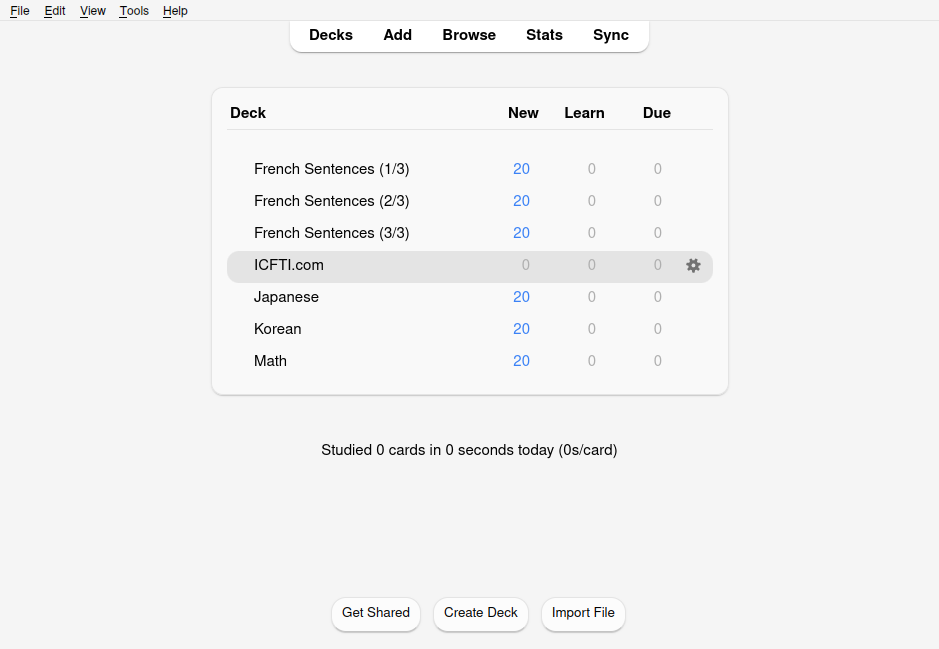
<p>For this article,
I have a three-part shared Anki deck of French Sentences,
that I want to combine into one.</p>

<p><img src="/blog/assets/images/posts/anki/merge-decks/anki-multi-part-deck.png" alt="Anki Multi-Part Shared Deck" /></p>

<p>We’re going to move all the cards from our <em>source decks</em>
(Part 2 and Part 3)
into our <em>destination deck</em> (Part 1).</p>

<h2 id="1-select-cards-to-merge">1. Select Cards to Merge</h2>

<p>Click the browse button at the top of the main window
in order to enter the Anki card browser.</p>

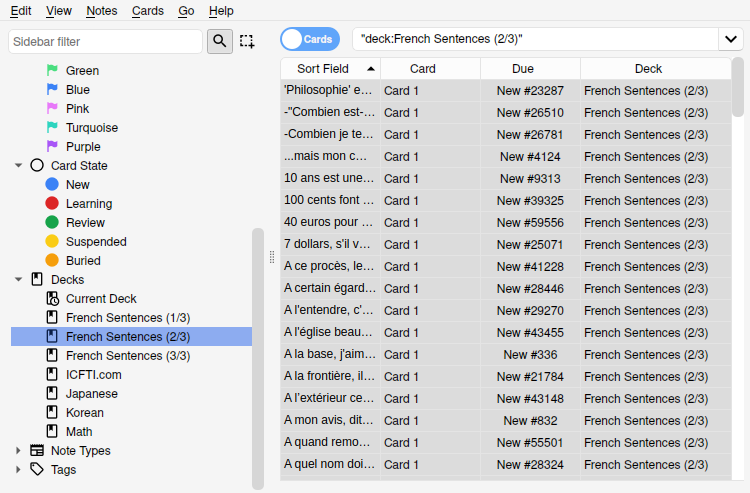
<p>From here,
click the source deck,
and select all the cards.</p>

<p><img src="/blog/assets/images/posts/anki/merge-decks/anki-select-all-cards.png" alt="Anki: Select All Cards" /></p>

<h2 id="2-add-tags-to-cards">2. Add Tags to Cards</h2>
<p>This step is optional, but <strong>highly recommended</strong>.
Once you merge decks,
you may decide in the future,
for whatever reason,
to separate them again.
But you’ll need some way to determine which cards were in which deck.</p>

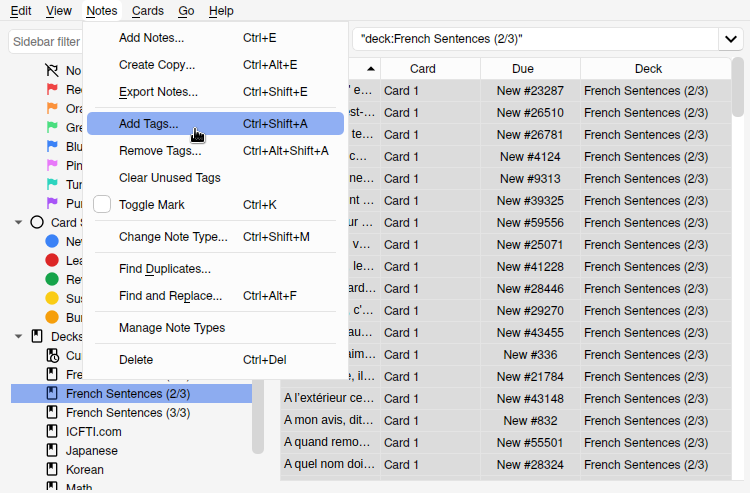
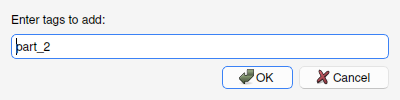
<p><img src="/blog/assets/images/posts/anki/merge-decks/anki-add-tags-menu.png" alt="Anki: Add Tags Menu Location" /></p>

<p>To do so, navigate to <code class="highlighter-rouge">Notes</code> &gt; <code class="highlighter-rouge">Add Tags</code> menu location.</p>

<p><img src="/blog/assets/images/posts/anki/merge-decks/anki-add-tag.png" alt="Anki: Add Tags" /></p>

<p>Then add a tag describing the original deck.
Here are some tips for adding tags:</p>
<aside>
Check the sidebar of the card browser
to see currently used tags
and avoid adding duplicates
</aside>
<ul>
  <li>Don’t use superfluous tags.
  For instance,
  you don’t need to have <code class="highlighter-rouge">Japanese</code>, <code class="highlighter-rouge">jp</code>, and <code class="highlighter-rouge">nihongo</code> tags.</li>
  <li>
    <p>Using spaces will treat words as separate tags.
  Instead use, an underscore ‘_’ or hyphen ‘-‘,
  to separate words in a tag.</p>

    <p>Examples: needs_image, casual-slang, test-2_vocab</p>
  </li>
  <li>Don’t use commas to separate multiple different tags.
  The comma itself will become part of the tag.
  <strong>Only spaces.</strong></li>
</ul>

<h2 id="3-merge-anki-decks">3. Merge Anki Decks</h2>

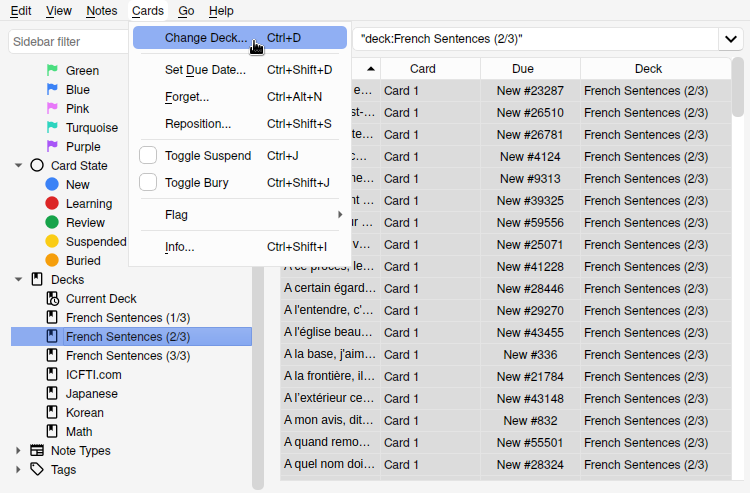
<p><img src="/blog/assets/images/posts/anki/merge-decks/anki-change-deck-menu.png" alt="Anki - Location of Change Deck Menu Location" /></p>
<ol>
  <li>
    <p>With the cards still selected,
 from the top menu, select <code class="highlighter-rouge">Cards</code> then <code class="highlighter-rouge">Change Decks</code></p>

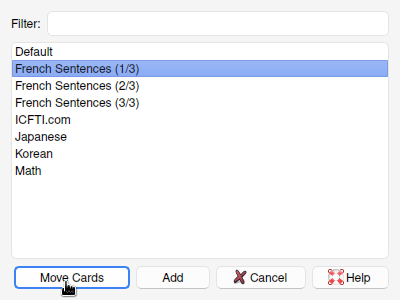
    <p><img src="/blog/assets/images/posts/anki/merge-decks/anki-move-cards.png" alt="Anki Move Cards" /></p>
    <aside>
 From here,
 you can also create a new deck,
 rather than move to an existing one.
 </aside>
  </li>
  <li>
    <p>When the box appears,
select the destination deck,
and click <code class="highlighter-rouge">Move Cards</code>.</p>
  </li>
</ol>

<h2 id="4-cleanup">4. Cleanup</h2>
<p>We’ve moved all the cards to the proper deck,
but now we have an empty source deck.
So delete it.</p>

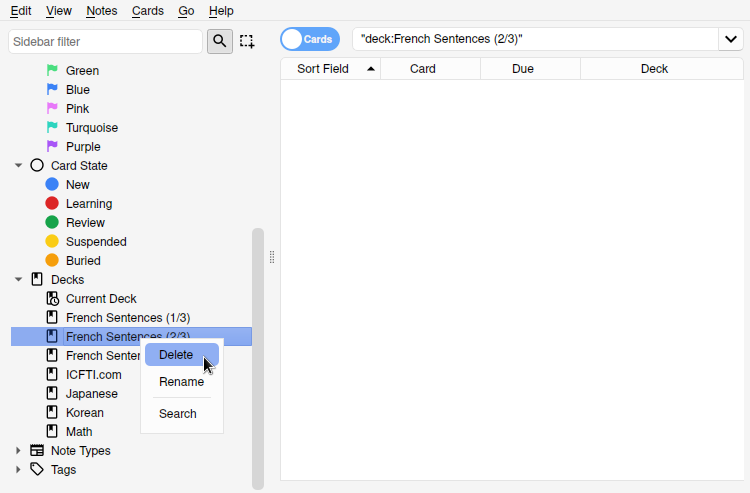
<p><img src="/blog/assets/images/posts/anki/merge-decks/anki-delete-deck-card-browser.png" alt="Anki: Delete Empty Deck - Card Browser" />
<img src="/blog/assets/images/posts/anki/merge-decks/anki-delete-deck-main-menu.png" alt="Anki: Delete Empty Deck - Main Menu" /></p>

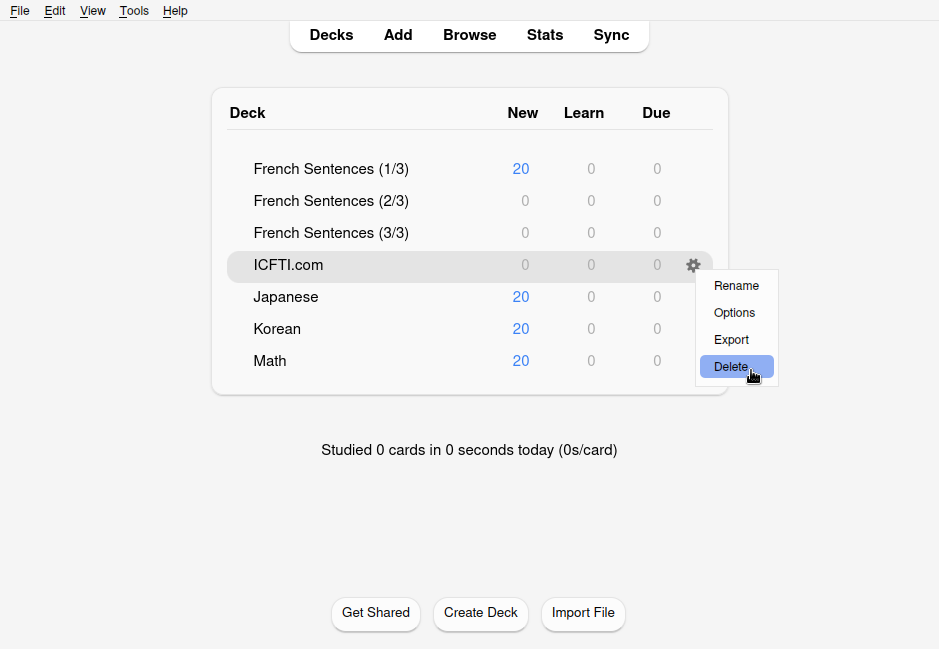
<p>This can be done by right clicking the deck in the card browser,
or by selecting the gear icon,
next to the deck on the main menu.</p>

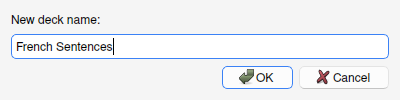
<p>Optionally,
rename the final deck.
This option can also be found in te card browser
or main menu.</p>

<p><img src="/blog/assets/images/posts/anki/merge-decks/anki-change-deck-name.png" alt="Anki: Change Deck Name" /></p>

<p>Since only part one exists now,
we can delete <code class="highlighter-rouge">(1/3)</code> from the name.</p>

<p>If you have more than 2 decks to merge,
repeat the processes starting from
<a href="#2-add-tags-to-cards">step 2</a>.</p>

<h2 id="conclusion">Conclusion</h2>
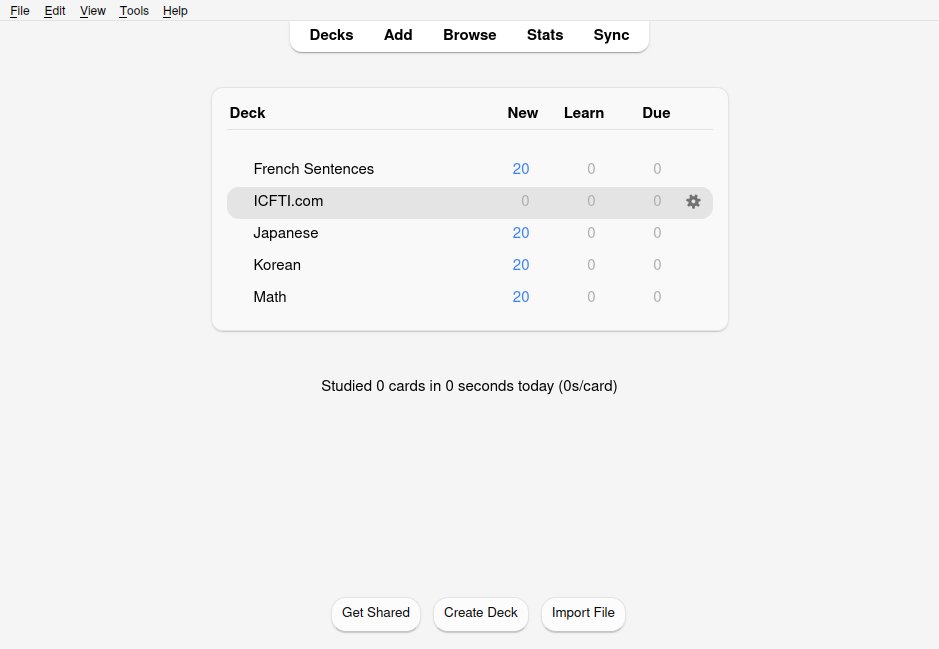
<p><img src="/blog/assets/images/posts/anki/merge-decks/anki-final-merged-decks.png" alt="Anki: Final Merged Decks" /></p>

<p>And that’s it!
We’ve combined multiple anki decks,
and merged them into one deck.
We also cleaned everything up,
and stayed organized.
Now we’re ready to study.</p>

<p>For other great Anki tips,
see our article about
<a href="/blog/anki-proper-deck-organization/">anki deck organization</a>.</p>]]></content><author><name>Isaac Phillips</name></author><category term="how to" /><category term="anki" /><category term="foss" /><category term="howto" /><category term="learning" /><category term="software" /><category term="tech" /><summary type="html"><![CDATA[If you use Anki for any length of time, there are many occasions where you could find cards split up across multiple decks even though they should probably be in the same deck.]]></summary><media:thumbnail xmlns:media="http://search.yahoo.com/mrss/" url="https://itcamefromtheinternet.com/blog/assets/images/posts/anki/anki-deck-count-warning.png" /><media:content medium="image" url="https://itcamefromtheinternet.com/blog/assets/images/posts/anki/anki-deck-count-warning.png" xmlns:media="http://search.yahoo.com/mrss/" /></entry><entry><title type="html">Living in VR 24/7</title><link href="https://itcamefromtheinternet.com/blog/living-in-vr/" rel="alternate" type="text/html" title="Living in VR 24/7" /><published>2023-08-10T00:00:00-04:00</published><updated>2023-08-10T00:00:00-04:00</updated><id>https://itcamefromtheinternet.com/blog/living-in-vr</id><content type="html" xml:base="https://itcamefromtheinternet.com/blog/living-in-vr/"><![CDATA[<p>It’s believed that
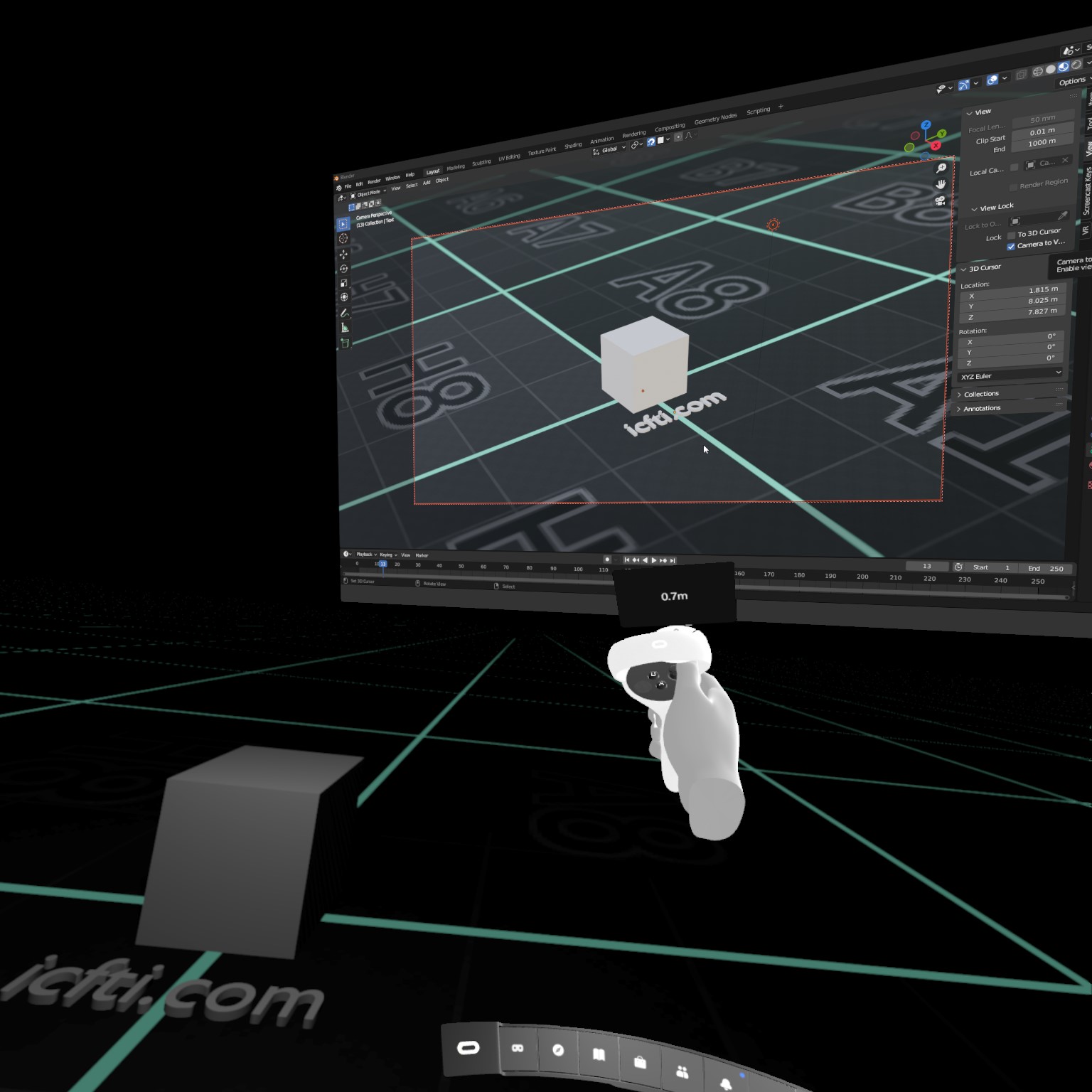
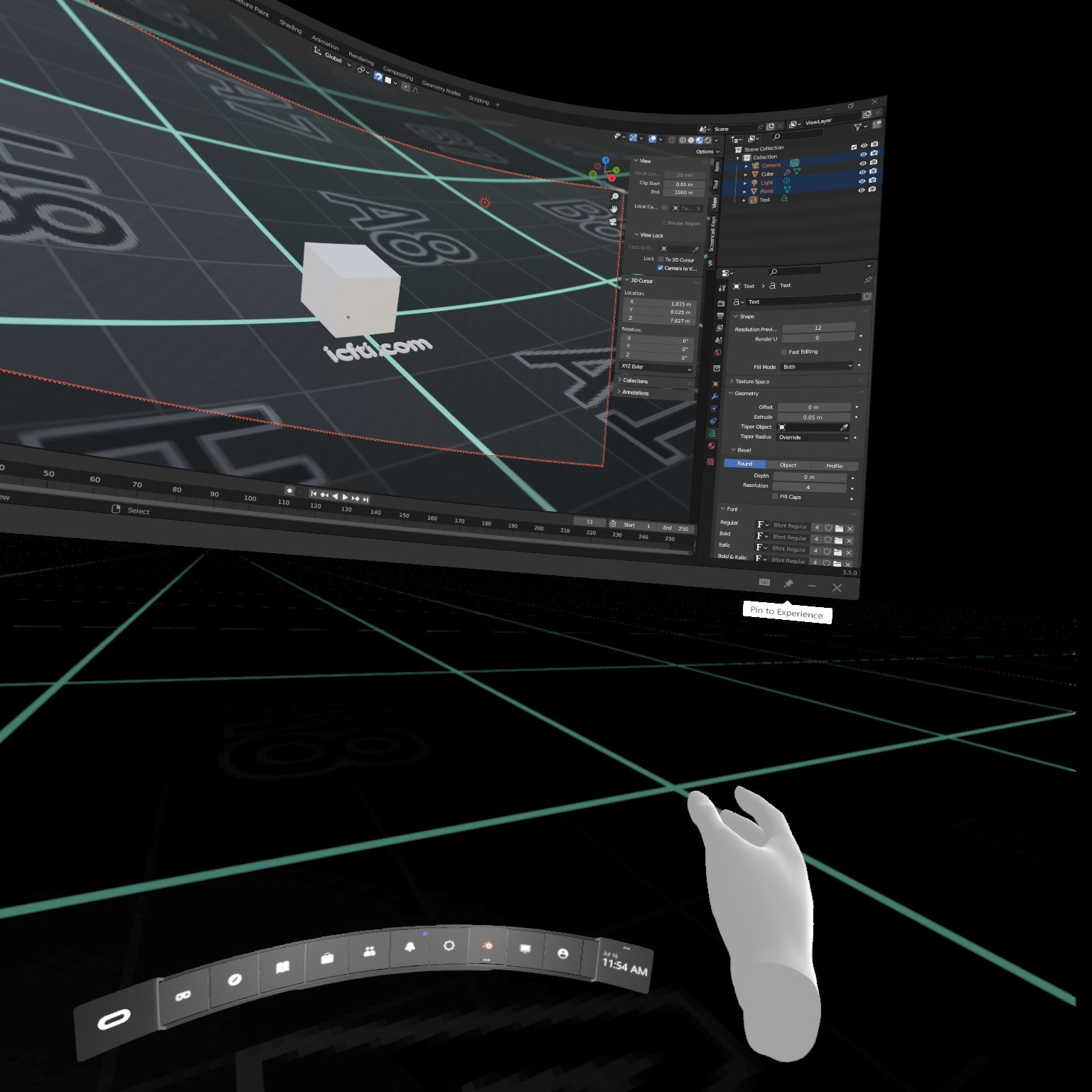
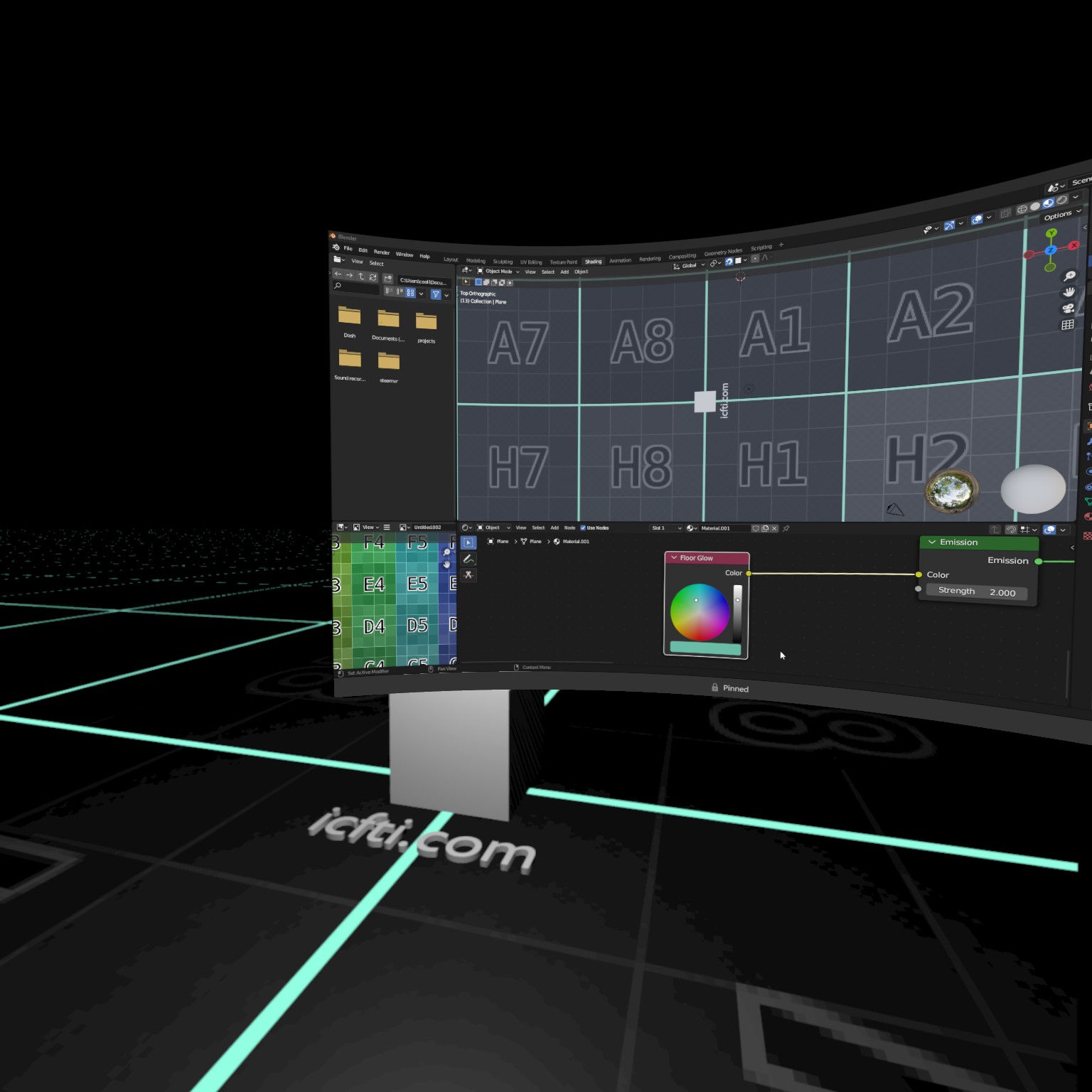
in the very near future,
it will be possible to live completely in VR.</p>

<p>But what if I told you that perhaps it’s already possible.
<!-- more -->
This article explores just that.
It is assuming you’re staying at home,
in VR 24/7,
and that you don’t have to leave the comfort of your own home.</p>

<h2 id="work">Work</h2>

<p>Unfortunately,
most of us,
will have to work to survive.
Fortunately,
with today’s technology,
it’s possible to do so in VR.
Let’s look at some options.</p>

<h3 id="entry-level">Entry Level</h3>
<p>There are lots of low-barrier,
easy to obtain,
and remote jobs available.
You might consider positions such as
data entry, translation, or customer service.</p>

<p>Most of these positions are part-time,
and have high turnover,
so are always available.
They require no prior experience,
and no special equipment to complete.
Work from home jobs are perfect for living in VR.</p>

<h3 id="office-not-needed">Office Not Needed</h3>
<p>For more specialized or skilled positions,
COVID-19 has shown employers something
that their employees have known for a long time:
Not all jobs have to be done in the office.</p>

<p>As the world became more technologically connected,
it became easier for many jobs to be completed from home.
As long as you have a stable internet connection,
your tasks can be distributed, and submitted remotely.
Everything from programmers to engineers
and even men and women working in sales
can work successfully,
all without ever entering an office.</p>

<h3 id="vr-meetings">VR Meetings</h3>
<p>As the world transitions to remote work,
aligning with remote coworkers becomes even more important.
Corporate meetings in VR is a growing trend.
Just take a look on Steam or the Oculus store
at the number of apps that provide this function.</p>

<h3 id="building-vr-spaces">Building VR Spaces</h3>
<p>Virtual Reality itself brings with it a new industry for a career.
The VR world will need people to create it.
Programmers, are always in high demand,
but there is also need for designers, 3D artists, and beta testers.
See <a href="#vr-products">VR Products</a> below for more ideas on what to sell.</p>

<aside>
More on in-world jobs below in the
<a href="#virtual-entertainers">Virtual Entertainers</a>
section.
</aside>
<p>Additionally, there’s a whole economy within many VR universes.
You don’t have to look too far
to find an in-world job that will pay real money.
You can even gamble away that hard earned coin.</p>

<h2 id="school">School</h2>
<p>If you’re not working yet,
or even if you just want to continue your education,
VR can greatly assist in the learning process.</p>

<p>For many of the same reasons as <a href="#work">working in VR</a>,
school can now be attended remotely.
Some schools,
and many individual education programs,
provide <a href="#vr-meetings">virtual classrooms</a>
where you can learn with other classmates in VR.</p>

<h3 id="visualizations">Visualizations</h3>
<p>One thing that makes learning in VR particularly interesting,
is the ability to conjure visualizations,
which are impossible to create in real life.</p>

<p>Students absorb information,
and learn in many different ways from each other.
Sometimes teachers and professors have a difficult time
conveying difficult concepts to all types of learners.
With VR however, instructors can use interactive 3D graphics
to convey concepts that are difficult to draw on a 2D board.</p>

<h2 id="shopping">Shopping</h2>
<p>Hey, did you know you could buy things on the internet?
Shocker, I know.</p>

<h3 id="e-commerce">E-Commerce</h3>
<p>VR systems come equipped with a web browser,
so you can still access all your favorite ecommerce sites.
As VR grows,
many of these companies will create dedicated apps,
for a more natural viewing experience.
Think of how web sites started making mobile apps for their services.</p>

<h3 id="vr-products">VR Products</h3>

<p>Just like in real life,
you’re going to want things for your virtual self.
Some of the shopping you might do are for:</p>
<ol>
  <li>Avatars</li>
  <li>Clothes</li>
  <li>Houses</li>
  <li>Entire Worlds!</li>
</ol>

<h2 id="socializing">Socializing</h2>
<p>Many unfamiliar people believe that someone who stays at home all the time
does not socialize.
This is not the case in VR at all.
Virtual worlds such as the famous VR Chat,
the Facebook-backed Metaverse,
and even the oldie-but-goodie Second Life,
are all virtual communities centered around socialization.</p>

<p>Currently there are several VR ecosystems,
that connect various VR worlds into a cohesive universe.</p>

<p>Which group will reign supreme?</p>
<ol>
  <li>Metaverse</li>
  <li>Mozilla Hubs</li>
  <li>Nvidia Omniverse</li>
</ol>

<p>While the competition for supreme VR environment is ongoing,
the social media landscape is starting to converge.
Many social media companies are merging into one,
or provide some form of cross compatibility between the each other.
The Fediverse in particular allows
connecting to different types of social media platforms
with one account.</p>

<p>Hopefully in the future
we’ll be able to freely jump between all the connected VR platforms.</p>

<h2 id="entertainment">Entertainment</h2>

<p>You’re probably looking to live in VR
because you already find it entertaining.
But here are some additional ideas of what to do in your new VR life.</p>

<h3 id="imax-movies">IMAX Movies</h3>
<p>Watching movies in VR is amazing.
It’s your own personal IMAX theater,
except you can choose your own seat,
cheaper snacks,
and you can yell at the screen,
without strangers getting mad.</p>

<h3 id="vr-movies">VR Movies</h3>
<p>The only thing cooler than watching a movie using your VR headset,
is watching a movie specifically designed for VR.
One that you can walk around in,
and see the characters and scenes from your own point of view.
Walk around a scene as it’s happening,
and be right there,
part of the action.</p>

<p>However, most VR movies
will come in the form of the interactive experience
that is video games.</p>

<h3 id="video-games">Video Games</h3>
<p>Many video games are being made specifically for VR.
Amazing worlds that can really pull you into a fantasy universe,
or horror games that will scare the pants off you in first person.
Even older games are being ported to work in VR.</p>

<h3 id="virtual-entertainers">Virtual Entertainers</h3>

<p>Other’s in VR provide entertainment services.
When you need somewhere to hang out,
there are always clubs available.
These virtual clubs are often looking for in-world entertainers to hire.
This could be a comedian at a stand-up comedy club,
a lounge singer,
or even GoGo dancers.</p>

<h2 id="sleep">Sleep</h2>
<p>There are some who do it,
but for me,
VR Headsets are a bit too bulky to sleep in right now.
One day however, they may be as lightweight as a sleep mask.</p>

<p>Then we can go to sleep in a peaceful environment, with soft sounds,
and wake up to a sunrise in paradise.</p>

<h2 id="conclusion">Conclusion</h2>
<p>Not everyone will be able to fully move to VR right away.
We’ll still need mechanics, surgeons, and other positions to work in person,
but there’s no reason that we can’t try out life in VR now.</p>]]></content><author><name>Taikun</name></author><category term="info" /><category term="lifestyle" /><category term="tech" /><category term="virtual_reality" /><category term="vr" /><summary type="html"><![CDATA[It’s believed that in the very near future, it will be possible to live completely in VR. But what if I told you that perhaps it’s already possible.]]></summary><media:thumbnail xmlns:media="http://search.yahoo.com/mrss/" url="https://itcamefromtheinternet.com/blog/assets/images/posts/blender/blender-vr/oculus-link_space.jpeg" /><media:content medium="image" url="https://itcamefromtheinternet.com/blog/assets/images/posts/blender/blender-vr/oculus-link_space.jpeg" xmlns:media="http://search.yahoo.com/mrss/" /></entry><entry><title type="html">How to Follow Lemmy Users</title><link href="https://itcamefromtheinternet.com/blog/how-to-follow-lemmy-users/" rel="alternate" type="text/html" title="How to Follow Lemmy Users" /><published>2023-07-29T00:00:00-04:00</published><updated>2023-07-29T00:00:00-04:00</updated><id>https://itcamefromtheinternet.com/blog/follow-lemmy-users</id><content type="html" xml:base="https://itcamefromtheinternet.com/blog/how-to-follow-lemmy-users/"><![CDATA[<p>Reddit users flocking to Lemmy
are looking for features they’re familiar with.
One of those is following other users’ activity.
<!-- more -->
On Reddit,
by subscribing to another user,
their posts and comments appear in your feed,
alongside subscribed community posts.
This article looks at how to do the same with Lemmy.</p>

<h2 id="finding-users">Finding Users</h2>

<p>The first step is to find the user within Lemmy.
There are two ways to do this.</p>

<h3 id="browsing-lemmy">Browsing Lemmy</h3>
<p>If you’re scrolling through Lemmy and see a post,
it’s easy enough to just click the OP’s username
to see their other activity.
This works whether the user is on the same instance as you,
or if they’re cross-posting from another instance.</p>

<h3 id="using-the-search">Using the Search</h3>
<p>But if you’re trying to search for a user who’s name you remember,
one who advertised off-platform,
or someone on another instance,
you’ll have to use the search function.</p>

<p>To find users
head over to the search,
and search for
their handle.
You can do this by changing what’s being searched
from <code class="highlighter-rouge">All</code> to <code class="highlighter-rouge">Users</code>,
and user the search box.
Alternatively,
type the name into the <code class="highlighter-rouge">Creator</code> sub menu.</p>

<p>For example,
If they’re on the same instance as you,
you can just type their name.
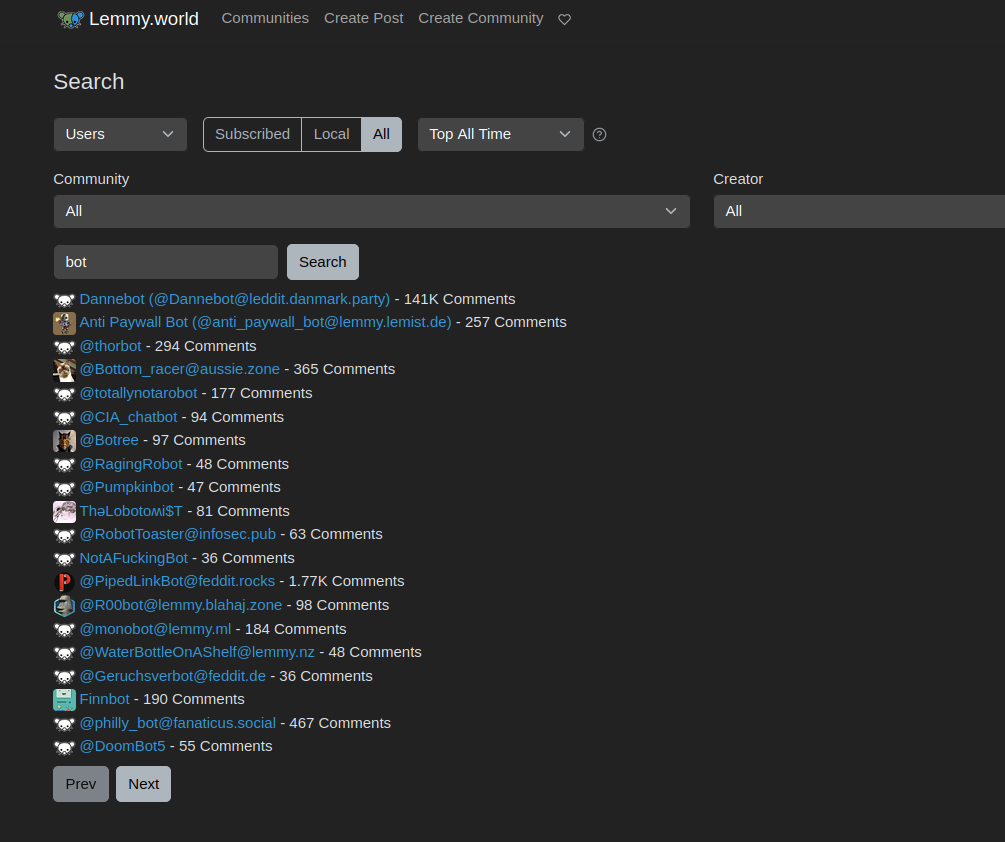
We searched for the word <code class="highlighter-rouge">bot</code>,
which show’s all users on the instance with the word <code class="highlighter-rouge">bot</code> in the name,
as well as any users on other instances,
which have already been federated.</p>

<p><img src="/blog/assets/images/posts/lemmy/lemmy-search-user-same-instance.png" alt="Searching For User on Same Instance" /></p>

<aside>
Your instance has to allow federation with the instance that the user is on.
If it doesn't,
the user won't show even if searching the full address.
In this case,
just search for them on their own instance.
</aside>
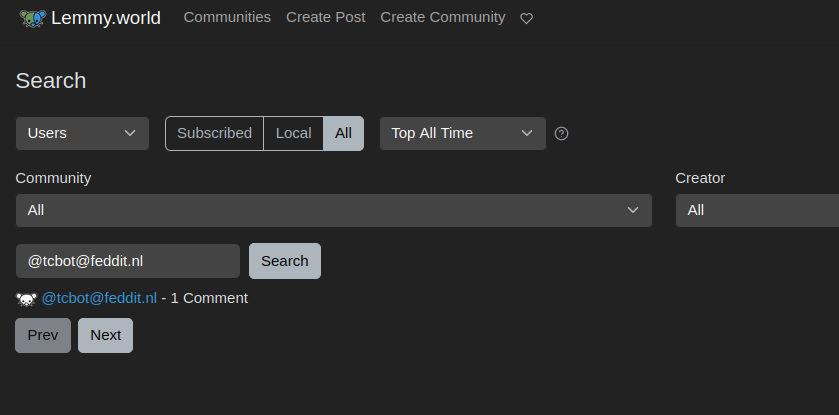
<p>However if they’re on a different instance,
they might not be federated to your home instance,
and won’t appear.
Therefore,
you need to type the whole address,
such as
<code class="highlighter-rouge">@&lt;user&gt;@&lt;instance&gt;</code>
For example,
our instance is <code class="highlighter-rouge">lemmy.world</code>.
I can search for my friend
<code class="highlighter-rouge">@tcbot@feddit.nl</code>
who is on the instance <code class="highlighter-rouge">feddit.nl</code>
like in the picture below:</p>

<p><img src="/blog/assets/images/posts/lemmy/lemmy-search-user-different-instance.png" alt="Searching For User on Different Instance" /></p>
<h2 id="following-users">Following Users</h2>

<aside>
This is actually a feature that was added to Reddit in the late stages,
in the form of Reddit "friends".
No one really cared about it until Reddit heavily pushed the feature,
so you may not even really miss it in Lemmy.
</aside>
<p>Unfortunately, not all instances allow following users.
For instance,
on <code class="highlighter-rouge">lemmy.world</code>,
the biggest instance,
you can’t <em>currently</em> follow specific users on Lemmy.
You can, however,
use the instructions above
to search for specific users,
to see what they’re up to.
This way you can
save, vote, and comment
on that user’s posts.
Additionally,
there’s always the good ole bookmark button in your browser.
Lemmy instance are constantly making developments and improvements,
so this may be a feature that is added in the future.</p>]]></content><author><name>Taikun</name></author><category term="how to" /><category term="foss" /><category term="howto" /><category term="lemmy" /><category term="self-hosted" /><category term="tech" /><summary type="html"><![CDATA[Reddit users flocking to Lemmy are looking for features they’re familiar with. One of those is following other users’ activity.]]></summary><media:thumbnail xmlns:media="http://search.yahoo.com/mrss/" url="https://itcamefromtheinternet.com/blog/assets/images/posts/lemmy/lemmy-search-user-different-instance.png" /><media:content medium="image" url="https://itcamefromtheinternet.com/blog/assets/images/posts/lemmy/lemmy-search-user-different-instance.png" xmlns:media="http://search.yahoo.com/mrss/" /></entry><entry><title type="html">Blender VR: 3D Modeling and Sculpting With Oculus Meta Quest and Free Software</title><link href="https://itcamefromtheinternet.com/blog/blender-vr-meta-quest-modeling-sculpting/" rel="alternate" type="text/html" title="Blender VR: 3D Modeling and Sculpting With Oculus Meta Quest and Free Software" /><published>2023-07-20T00:00:00-04:00</published><updated>2023-07-20T00:00:00-04:00</updated><id>https://itcamefromtheinternet.com/blog/blender-vr</id><content type="html" xml:base="https://itcamefromtheinternet.com/blog/blender-vr-meta-quest-modeling-sculpting/"><![CDATA[<h2 id="introduction">Introduction</h2>

<p>VR is an exciting space that all different industries are trying to get into.
If you’ve got a VR headset why not use it to explore your creations,
or better still,
to work on them inside the virtual world itself.
In this post we do just that.</p>

<p>The problem is,
there aren’t many roads to modeling while working in VR.
Blender’s official plugin only allows inspection of your scene,
not modification of it.
Free plugins that allow VR modeling,
such as Blender XR and the Maurui plugin have been discontinued.
And almost everything includes a fee to use their plugin or service.
That’s why we were excited to find a <strong>free</strong> method
for modeling and sculpting in Blender VR.</p>

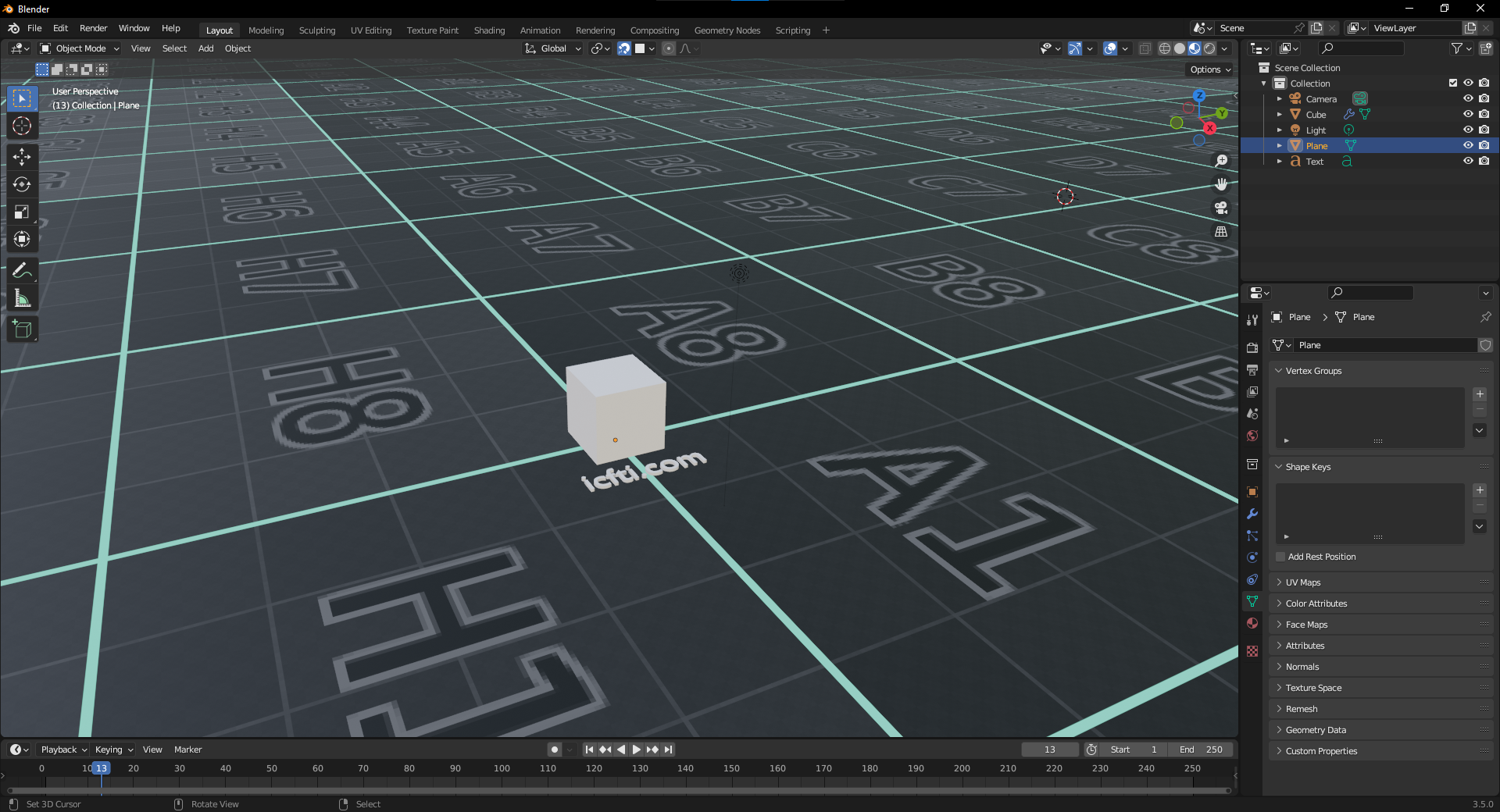
<p>For this example,
we’re going to use a Meta Quest 2.
I simply added
some shameless branding
to the Blender default cube scene,
as well as a tech-looking floor.
I also changed the world shader to an ominous black material.</p>

<p><img src="/blog/assets/images/posts/blender/blender-vr/blender-vr_initial-scene.png" alt="Blender Initial Scene" /></p>

<h2 id="part-1---oculus-setup">Part 1 - Oculus Setup</h2>

<aside>
Whether listed as for Rift or Quest,
there's only one Desktop software by Oculus,
so just download the one listed.
</aside>
<ol>
  <li>Download and install the
 <a href="https://www.oculus.com//Setup/" target="_blank" rel="noopener noreferrer">Oculus Rift/Oculus Link software</a></li>
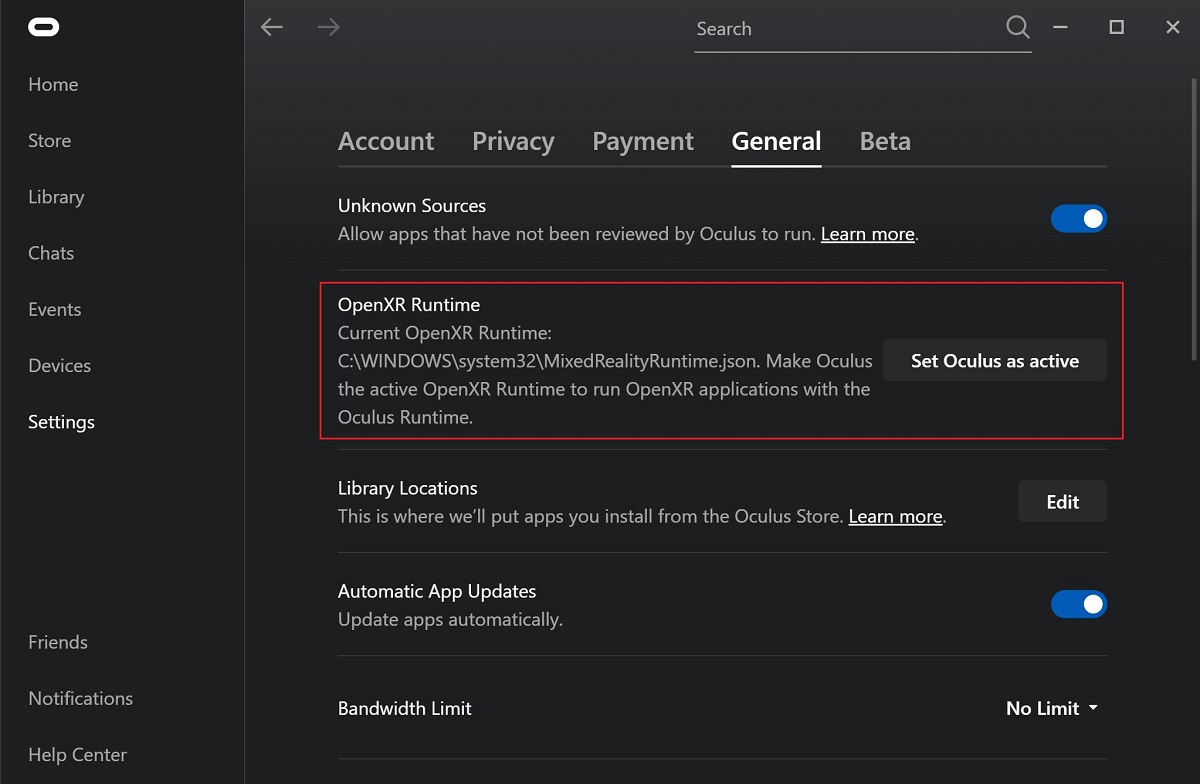
  <li>
    <p>Set Oculus as the active OpenXR runtime
 via the General tab in the Oculus App Settings.</p>

    <p><img src="https://docs.blender.org/manual/en/3.6/_images/getting-started_configuration_hardware_xr_runtime_oculus.jpg" alt="Open XR" /></p>

    <aside>
 The link cable is a special USB cable designed for transfering lots of data,
 such as straming to the VR headset.
 The charging cable packaged with the headset
 is not sufficient for use as a link cable.
 </aside>
  </li>
  <li>
    <p>Plug in your headset using a data link cable,
 and choose to Enable Quest Link.</p>

    <p><img src="TODO" alt="Quest Link Confirm" /></p>
  </li>
  <li>
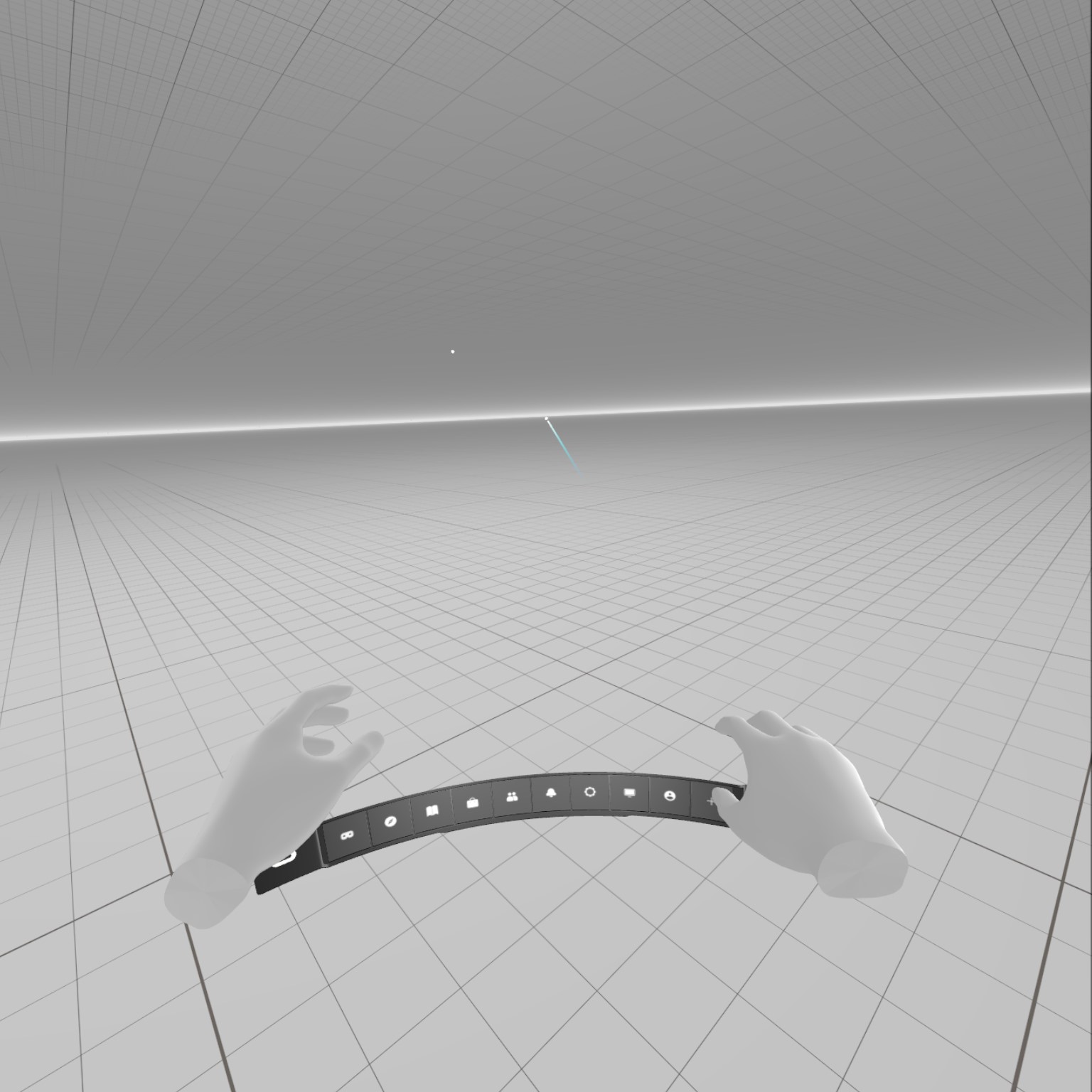
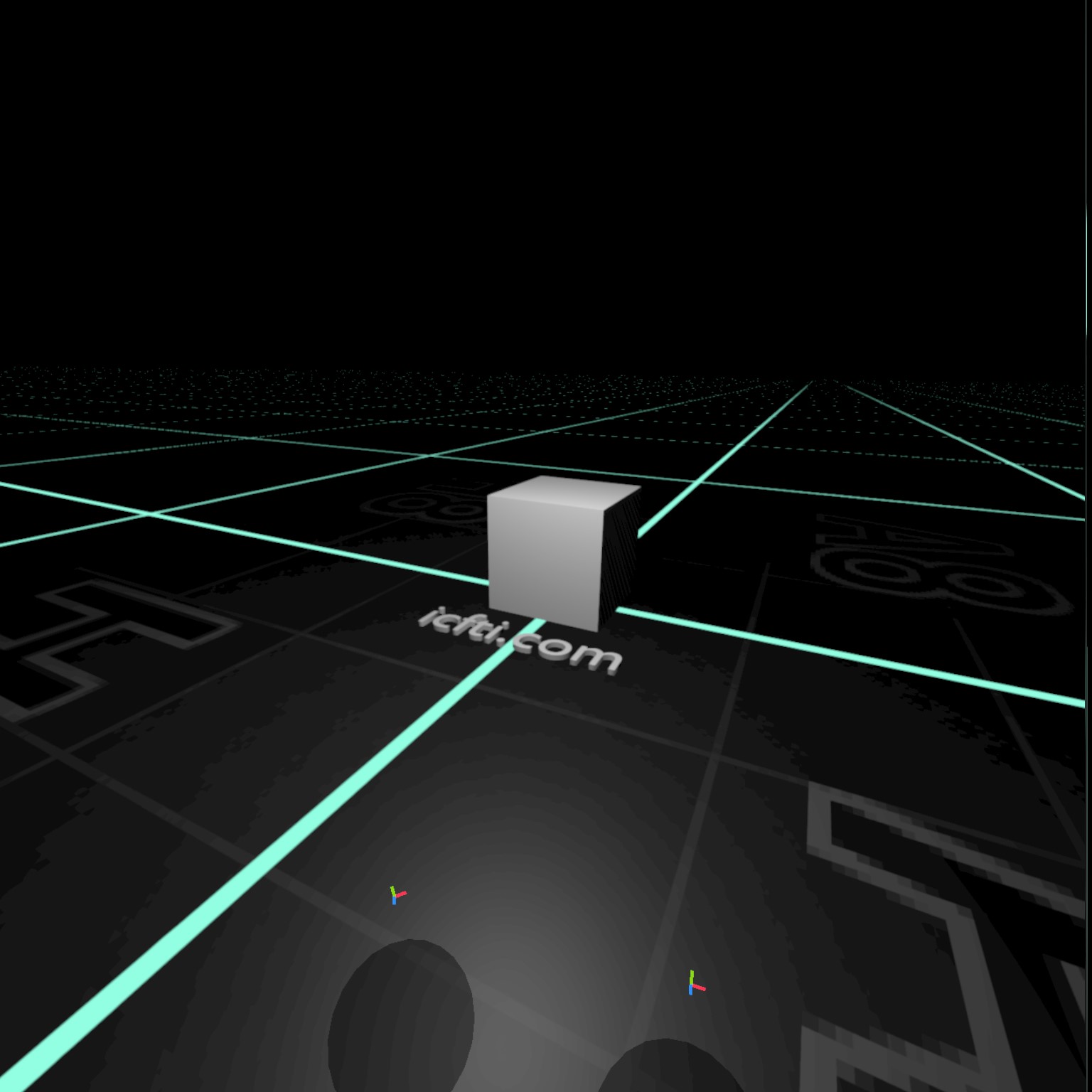
    <p>You’re in the Quest Link space
 when you see a blank world like the one below.
 All that’s here is a void VR space,
 and a menu at the bottom.</p>

    <p><img src="/blog/assets/images/posts/blender/blender-vr/oculus-link_space.jpeg" alt="Quest Link Blank World" /></p>
  </li>
</ol>

<h2 id="part-2---see-your-blender-world-in-vr">Part 2 - See your Blender World in VR</h2>
<ol>
  <li>
    <p>Take off the headset.
 Back at your PC,
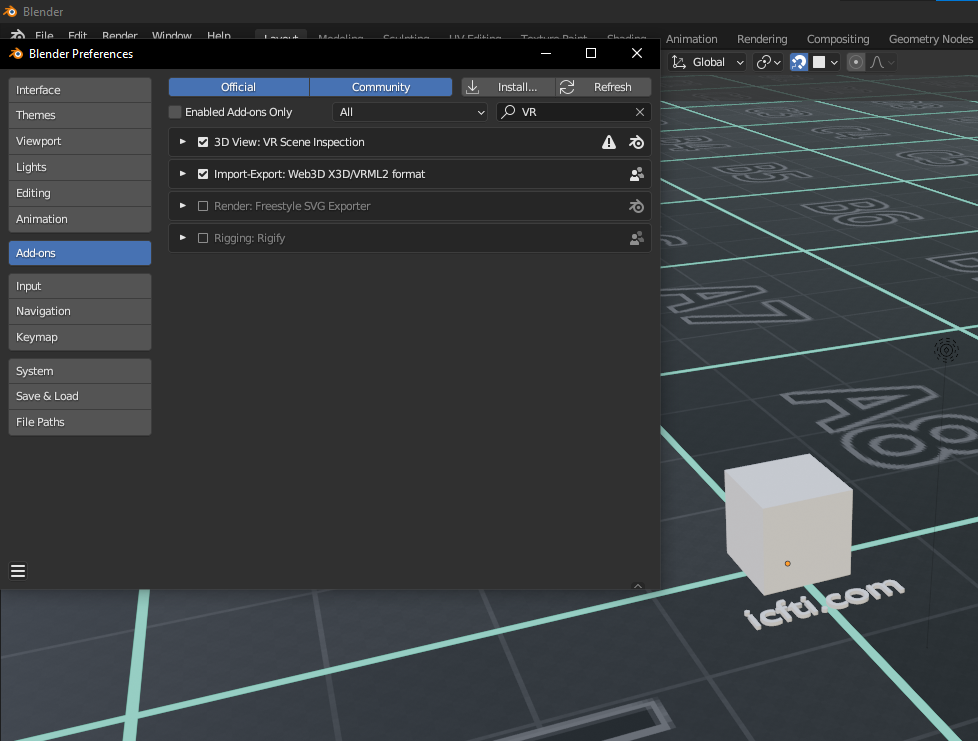
 enable the VR Scene Inspection add-on in Blender.</p>

    <p><img src="/blog/assets/images/posts/blender/blender-vr/blender-vr_addon.png" alt="Enabling the VR Inspection Add On" /></p>
  </li>
  <li>
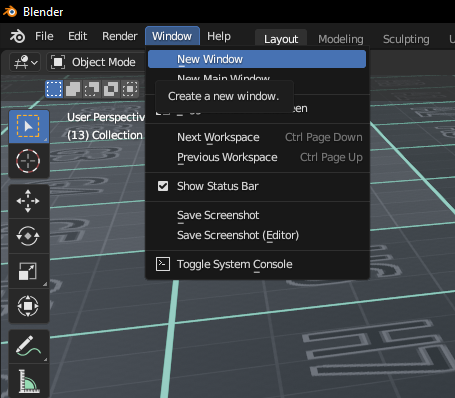
    <p>You could start it now, but instead I recommend creating a new window.
 This new window will be a minimalist window without all the toolbars.</p>

    <p><img src="/blog/assets/images/posts/blender/blender-vr/blender-vr_new-window.png" alt="Blender New Window" /></p>
  </li>
  <li>
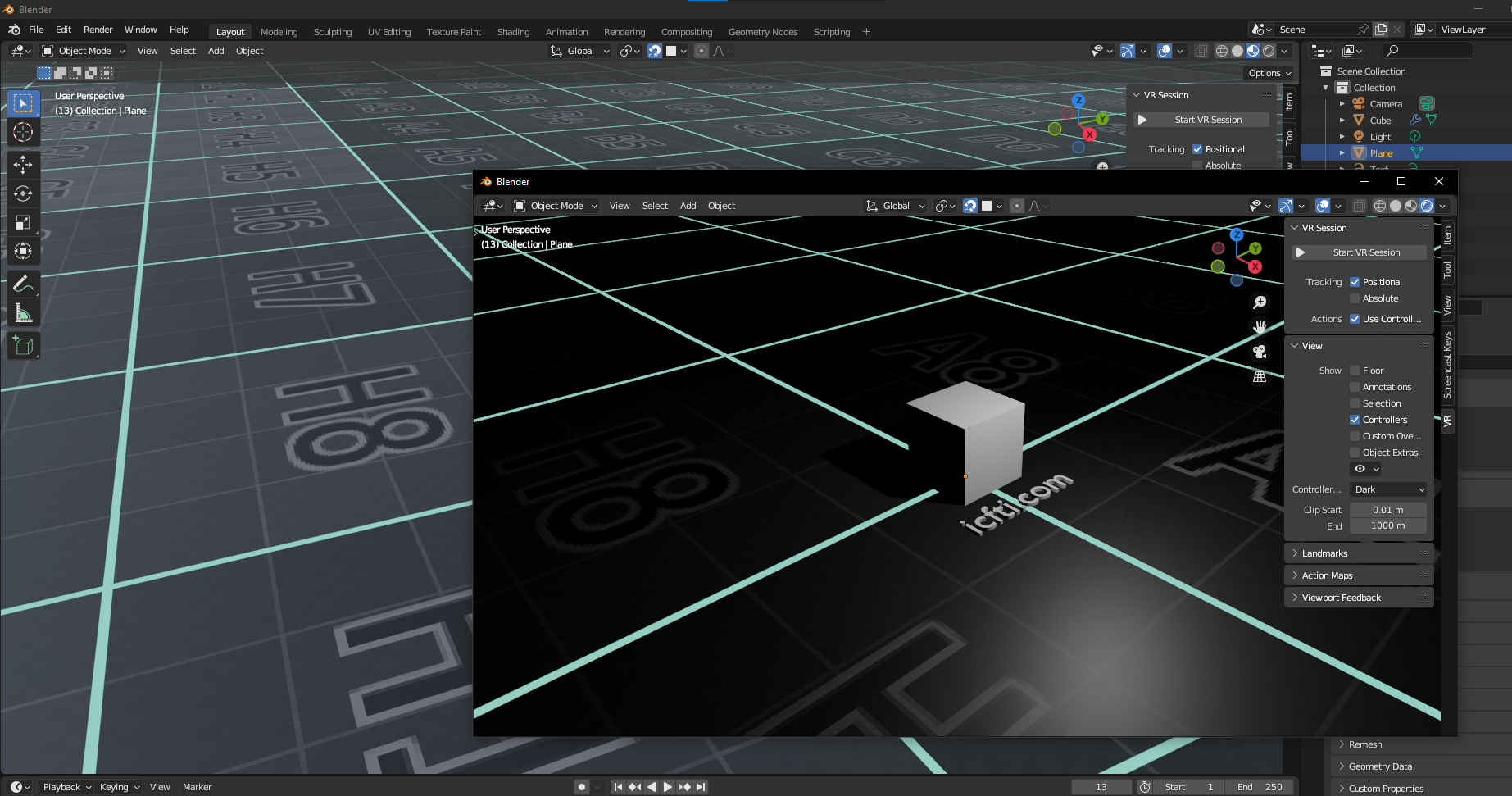
    <p>It’s important to understand that
 the VR Scene will show the same type of preview
 as the window in which the Scene Inspection addon is started.
 So first we opened a new window,
 and choose our preview type
 (we chose Render Preview with Eevee).</p>

    <p><img src="/blog/assets/images/posts/blender/blender-vr/blender-vr_second-window.png" alt="Blender Second Window" /></p>

    <aside> This is especially useful if using the
 <a href="#part-4---mirroring-optional">mirroring</a>
 feature.
 </aside>
    <p>This way, we still have our main window with all our toolbars.
 Render Preview will continue to be shown in VR,
 regardless of what we change our workspace viewport to.</p>
  </li>
  <li>
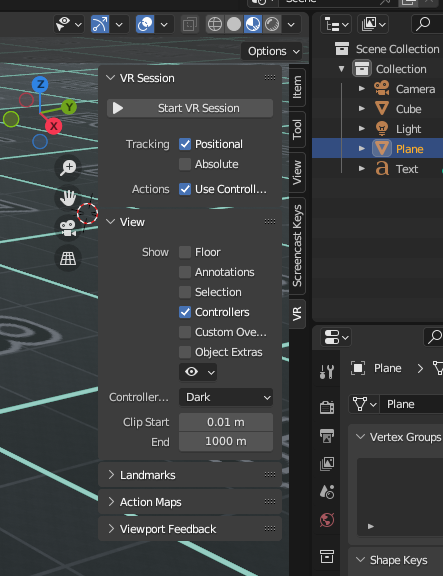
    <p>From within the new window,
 <code class="highlighter-rouge">Start VR Session</code> using the new VR side menu.</p>

    <p><img src="/blog/assets/images/posts/blender/blender-vr/blender-vr_options.png" alt="Blender VR Options" /></p>
  </li>
  <li>
    <p>Put your VR headset back on,
and verify you’re no longer in the VR void.
This is Blender VR Scene Inspection.
You can move around the object or world,
zoom in and out, up and down,
but can’t edit or move or edit any objects yet.
Read on for instructions on how to manipulate this space.</p>

    <p><img src="/blog/assets/images/posts/blender/blender-vr/blender-vr_space.jpeg" alt="Blender Initial Scene" /></p>
  </li>
</ol>

<h2 id="part-3---enable-usable-blender-window-in-vr-space">Part 3 - Enable usable Blender Window in VR space</h2>
<ol>
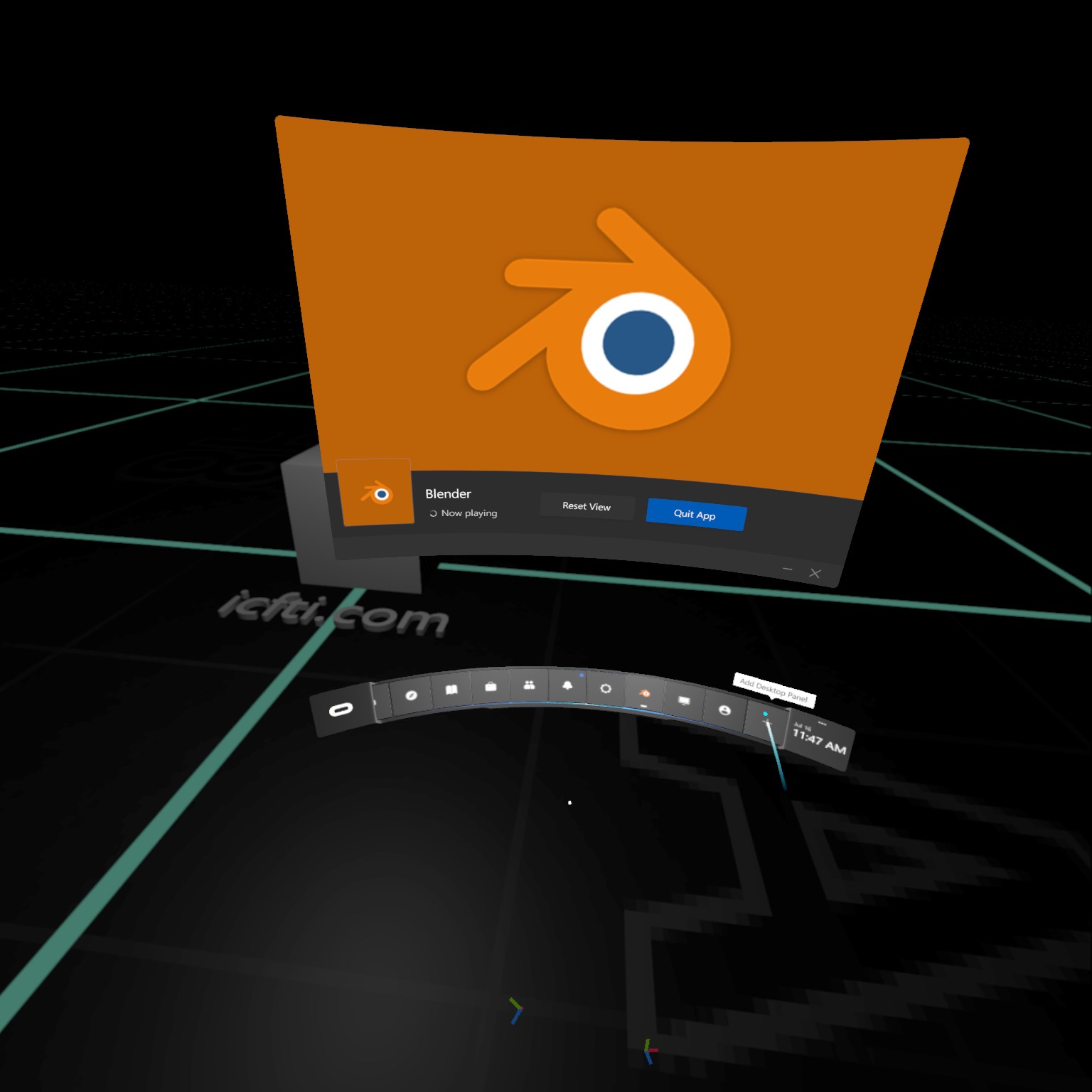
  <li>Open the menu
 by pressing the Oculus button on the right-hand controller.</li>
  <li>
    <p>Press the Add Desktop button at the right end of the Oculus Link menu.</p>

    <p><img src="/blog/assets/images/posts/blender/blender-vr/blender-vr_add-panel.jpeg" alt="Blender Add Panel" /></p>
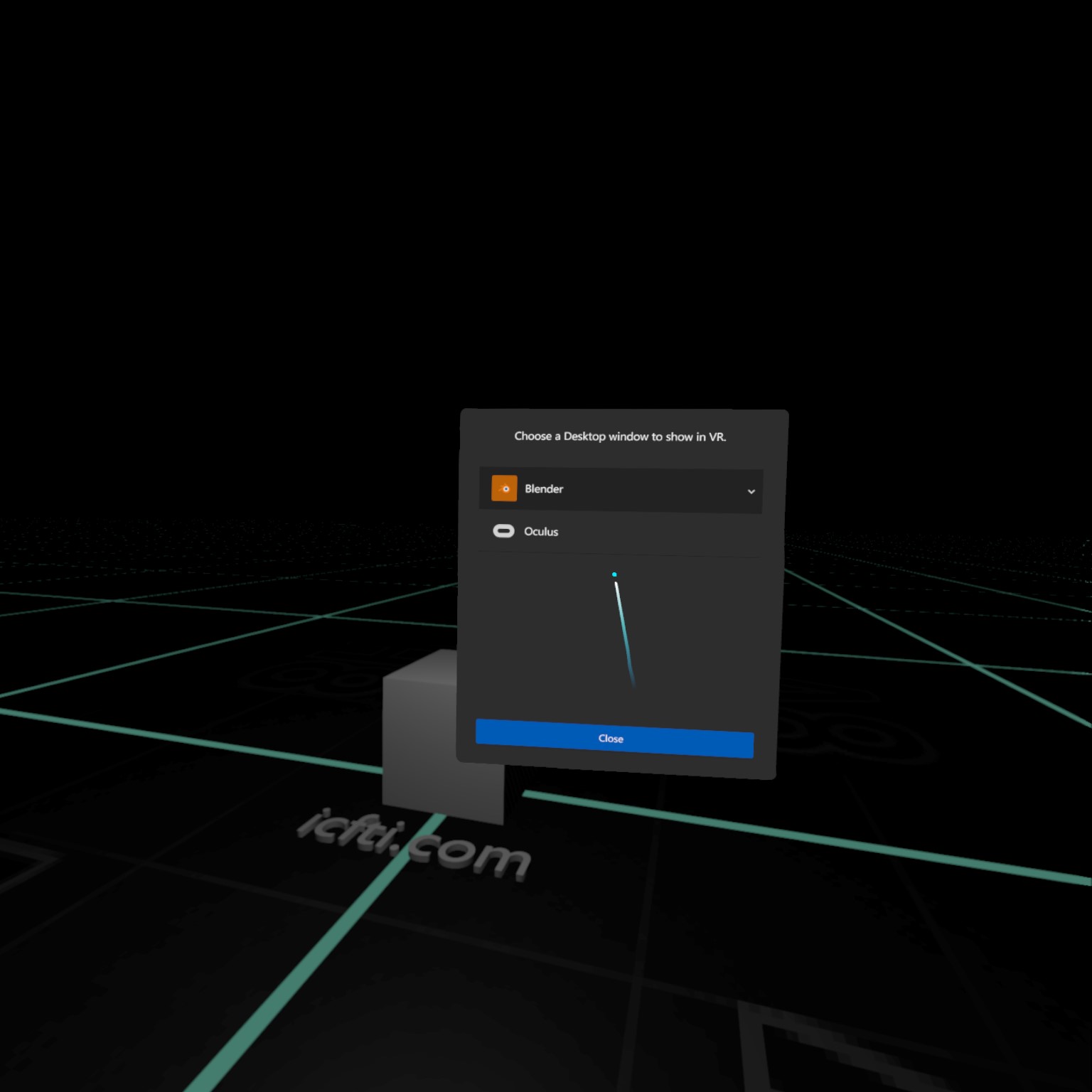
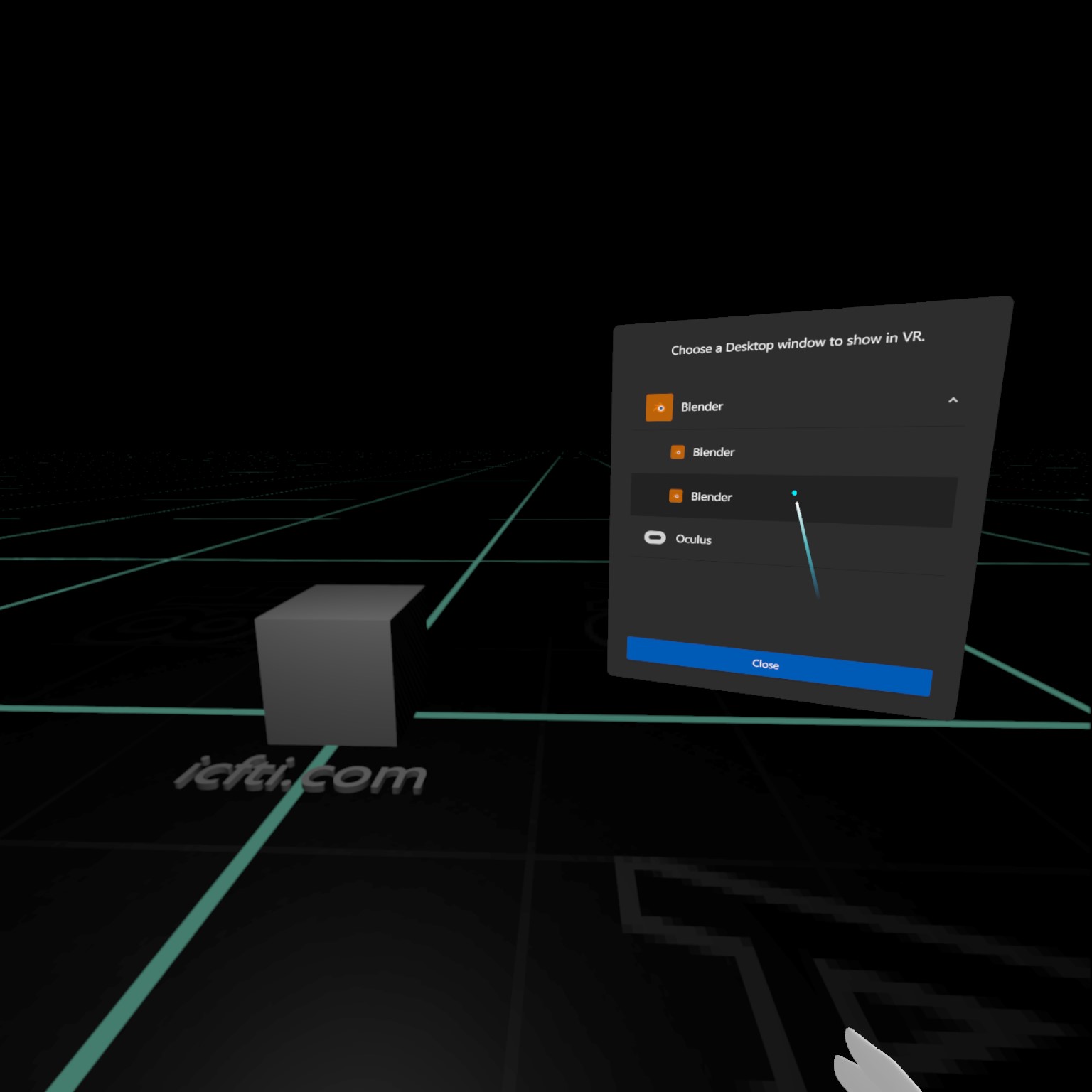
  </li>
  <li>
    <p>Notice the down arrow next to Blender.
 This means there are multiple windows to choose from.
 Go ahead and click it to reveal the windows.</p>

    <p><img src="/blog/assets/images/posts/blender/blender-vr/blender-vr_desktop-window-options.jpeg" alt="Blender Add Panel" /></p>

    <aside>
 If for reason the second one doesn't work,
 just go ahead and click the other one.
 </aside>
  </li>
  <li>
    <p>The first instance is the Blender VR Scene Inspection
 that we can already see.
 The second is the Blender window running on our PC, click that.</p>

    <p><img src="/blog/assets/images/posts/blender/blender-vr/blender-vr_select-window.jpeg" alt="Blender Add Panel" /></p>
  </li>
  <li>
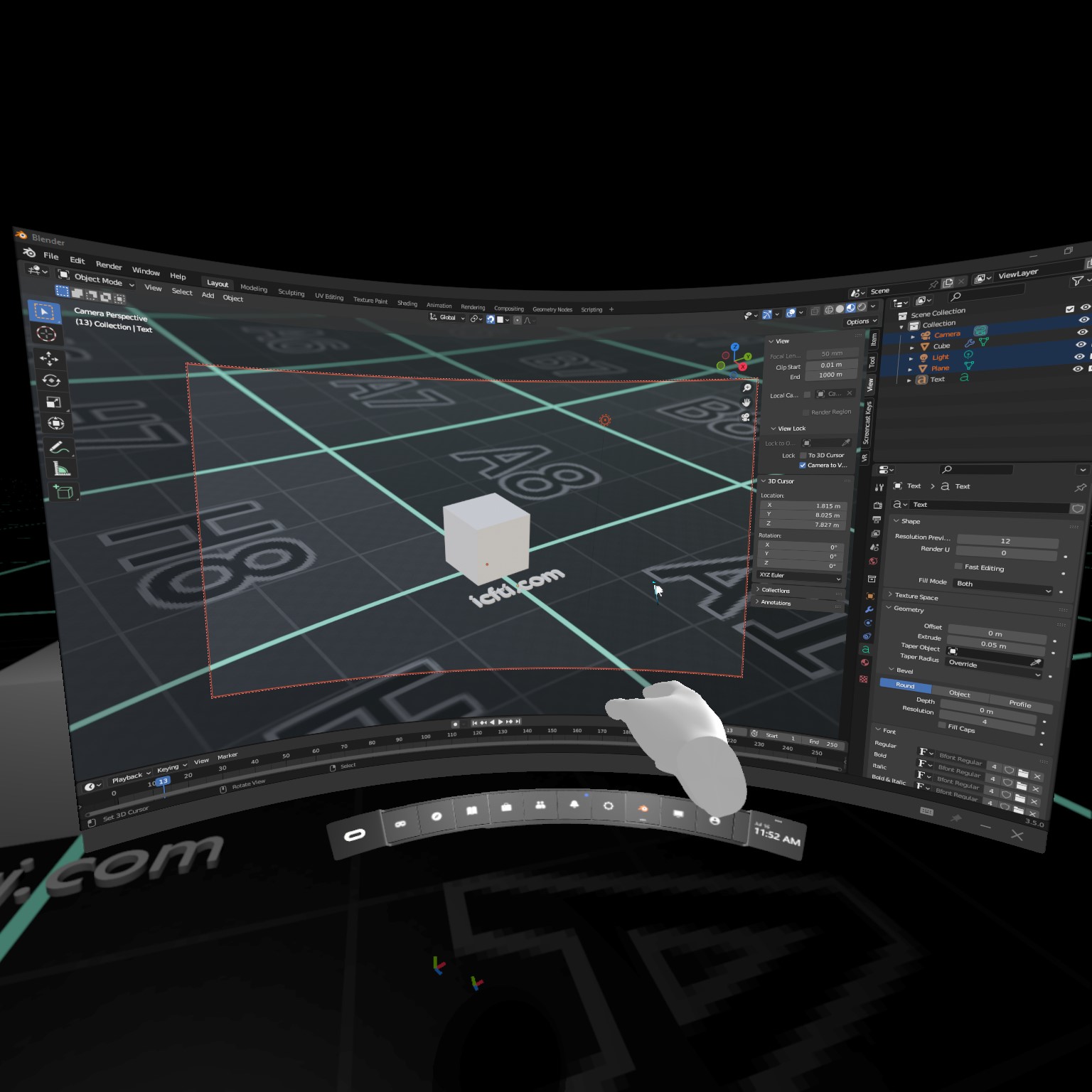
    <p>The Blender window running on your desktop should appear.</p>

    <p><img src="/blog/assets/images/posts/blender/blender-vr/blender-vr_initial-desktop.jpeg" alt="Blender VR Initial Desktop" /></p>
  </li>
  <li>
    <p>You can grab the window and move it wherever you like,
 including closer or farther away.
 Make sure you can still see the important elements of your scene.</p>

    <p><img src="/blog/assets/images/posts/blender/blender-vr/blender-vr_move-window-1.jpeg" alt="Blender Move Panel" /></p>
  </li>
  <li>
    <p>Pin the window using the button at the lower right.
 This allows you to work while viewing.
 If you don’t pin, the window will disappear
 once you exit the menu.
 You can still move this window after pinning it,
 by opening the menu again.</p>

    <p><img src="/blog/assets/images/posts/blender/blender-vr/blender-vr_pin-window.jpeg" alt="Blender Pin to VR Experience" /></p>
  </li>
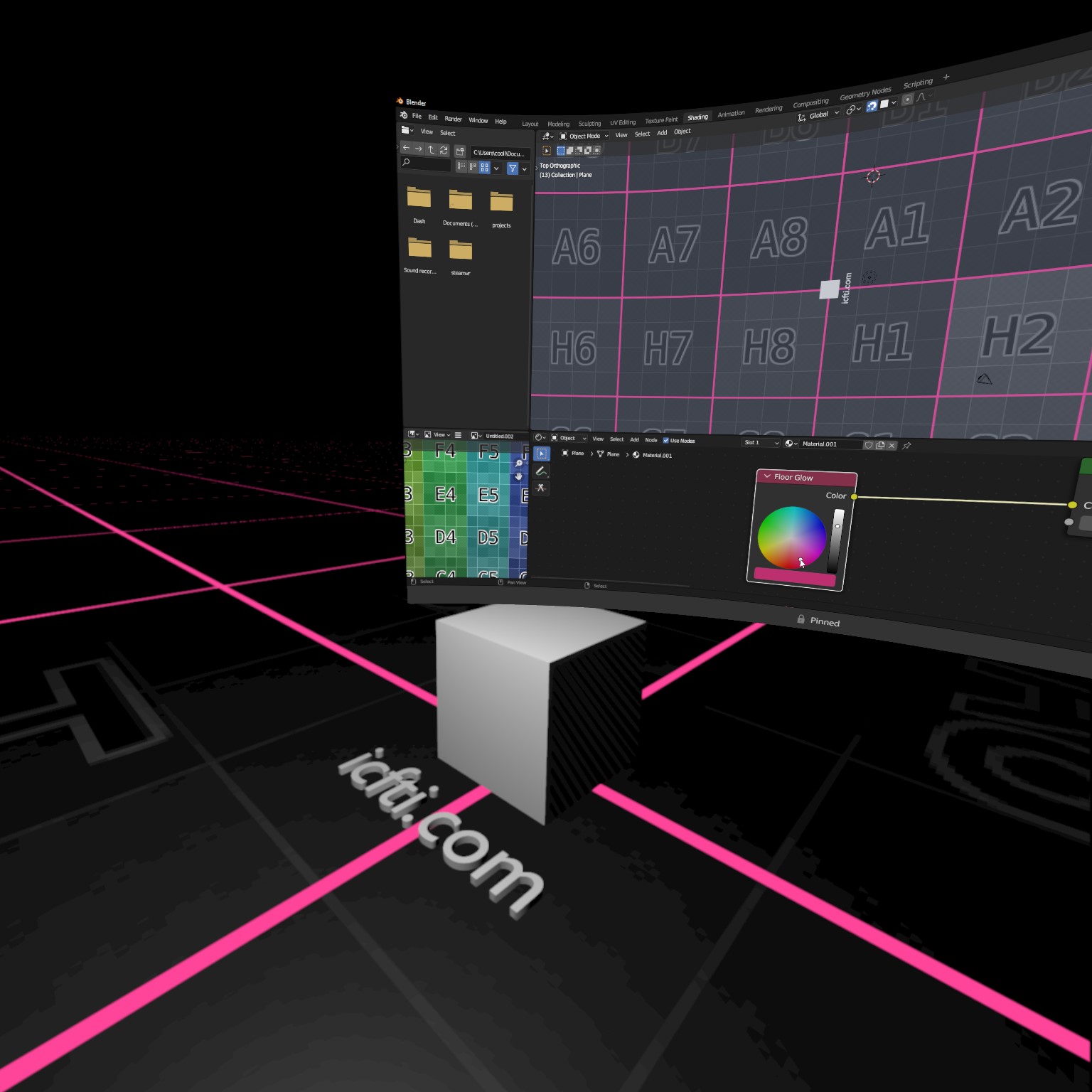
  <li>
    <p>Exit the menu.
 As you navigate the VR space,
 your window will stay in place.
 You’re now free to work in Blender.
 To do so, use the mouse and keyboard on your PC, as you normally would.
 If you need to look at the keyboard,
 look down the gap in the headset around your nose.</p>

    <p>While using the mouse and keyboard,
 I can see the window that appears on my desktop.
 Let’s make a change in the window and see how it affects the world.</p>

    <p><img src="/blog/assets/images/posts/blender/blender-vr/blender-vr_before-alteration.jpeg" alt="Blender VR Material" /></p>
  </li>
  <li>
    <p>Here you can see that I’ve changed the color of the material,
 which will also alter our VR space in real time.</p>

    <p><img src="/blog/assets/images/posts/blender/blender-vr/blender-vr_after-alteration.jpeg" alt="Blender VR Material Alteration" /></p>
  </li>
  <li>And that’s it!
Now go forth and dream new magnificent creations.</li>
</ol>

<h2 id="part-4---mirroring-optional">Part 4 - Mirroring (Optional)</h2>

<p>There’s one other handy feature of the Scene Inspector addon
that I want to mention.
With the mirroring feature, you can mirror what’s being seen in VR,
to the Blender window on the PC.
You can find this feature
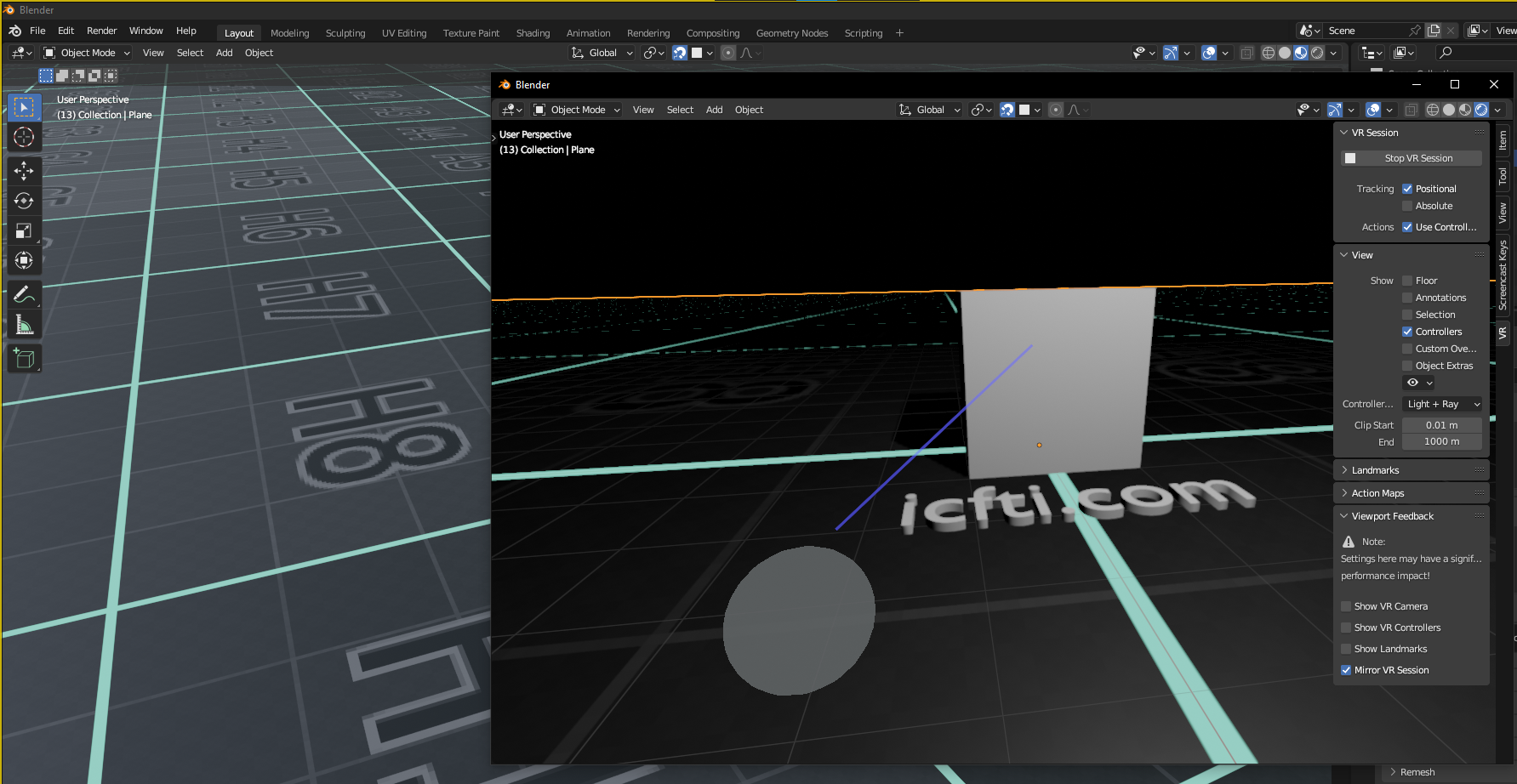
in the <code class="highlighter-rouge">Viewport Feedback</code> section
of the VR side menu.</p>

<p><img src="/blog/assets/images/posts/blender/blender-vr/blender-vr_mirror.png" alt="Blender VR Mirror" /></p>

<p>Now as you move around or turn your head in the VR scene,
the window will be updated to show what you’re seeing.</p>

<p>This is useful if you have someone else in the room with you,
who wants to see on the PC, what you’re seeing in the headset.
For recording/streaming, the resolution will also be higher on your PC,
rather than trying to record directly from the headset.</p>

<h2 id="conclusion">Conclusion</h2>

<p>We can’t yet grab vertices
and move them around with the controllers,
and instead must use a virtual copy of the Blender window.
However, this method allows you to modify your virtual world,
while experiencing it in VR.</p>

<p>By the way, here is the final Eevee render,
just in case you were curious.</p>

<p><img src="/blog/assets/images/posts/blender/blender-vr/blender-vr_final-render.png" alt="Blender Final Render" /></p>]]></content><author><name>Isaac Phillips</name></author><category term="how to" /><category term="art" /><category term="blender" /><category term="cgi" /><category term="meta" /><category term="oculus" /><category term="quest" /><category term="software" /><category term="tech" /><category term="vr" /><summary type="html"><![CDATA[Learn how to work on your projects while in VR, unlike other Blender VR tutorials, that only teach how to inspect already-completed scenes.]]></summary><media:thumbnail xmlns:media="http://search.yahoo.com/mrss/" url="https://itcamefromtheinternet.com/blog/assets/images/posts/blender/blender-vr/blender-vr_move-window-2.jpeg" /><media:content medium="image" url="https://itcamefromtheinternet.com/blog/assets/images/posts/blender/blender-vr/blender-vr_move-window-2.jpeg" xmlns:media="http://search.yahoo.com/mrss/" /></entry><entry><title type="html">RDAP vs WHOIS For Domain Lookups</title><link href="https://itcamefromtheinternet.com/blog/rdap-vs-whois/" rel="alternate" type="text/html" title="RDAP vs WHOIS For Domain Lookups" /><published>2023-02-01T00:00:00-05:00</published><updated>2023-02-01T00:00:00-05:00</updated><id>https://itcamefromtheinternet.com/blog/rdap-vs-whois</id><content type="html" xml:base="https://itcamefromtheinternet.com/blog/rdap-vs-whois/"><![CDATA[<h2 id="introduction">Introduction</h2>

<p>RDAP heralds a new era of
accurate, secure, and advanced access
to information about
domain names, IP addresses, and network protocols,
paving the way for a brighter future of the internet.</p>

<p>RDAP and WHOIS are two different protocols
for querying databases for information about
domain names, IP addresses, and network protocols.
While WHOIS has been the standard for many years,
RDAP (Registration Data Access Protocol)
and
WHOIS (Worldwide Health Organization Information System)
are two distinct methods
for accessing databases for information about
domain names, IP addresses, and network protocols.
WHOIS has been the dominant protocol for years,
but RDAP is a
newer, modern, and more advanced
option that offers several benefits over WHOIS.</p>

<p>RDAP was designed as a replacement for WHOIS
because of the increasing limitations of WHOIS that
became more pronounced as the internet evolved.
WHOIS was created in the early days of the internet
and has not been updated
to keep up with the changing needs of the internet community.
RDAP was developed to address these limitations
and improve upon the functionality of WHOIS.
It provides
more features, improved security, and better data accuracy.</p>

<h2 id="improved-functionality">Improved Functionality</h2>

<p>RDAP offers improved functionality over WHOIS.
It allows users to retrieve more detailed information about
domain names, IP addresses, and network protocols.
Additionally,
RDAP provides access to additional information
that is not available through WHOIS, such as
domain name registration dates, registrar information, and
contact information for domain name registrants.</p>

<h2 id="improved-security">Improved Security</h2>

<p>RDAP provides improved security compared to WHOIS
because it uses HTTPS for all communications,
which encrypts all transmitted data.
This protects sensitive information from being intercepted
and misused by malicious actors.</p>

<h2 id="better-data-accuracy">Better Data Accuracy</h2>

<p>RDAP provides more accurate data compared to WHOIS
because it requires registries and registrars
to maintain up-to-date information in their databases.
It also provides a mechanism for domain name registrants
to update their own information,
which helps to ensure that the data remains accurate and up-to-date.</p>

<h2 id="standardization">Standardization</h2>

<p>RDAP is an
IETF (Internet Engineering Task Force)
standard,
which means that it has been developed and reviewed
by a group of experts from around the world.
This level of standardization is not present in WHOIS,
which is not a standard protocol.
The standardization of RDAP helps to ensure that
data can be easily accessed and understood by all users,
regardless of location or technical expertise.</p>

<h2 id="adoption">Adoption</h2>

<p>The adoption of RDAP has been increasing
as more organizations recognize its advantages over WHOIS.
The European Registry for Internet Domains (EURid),
for example,
has been using RDAP since 2018,
providing access to information about over 3 million domain names.
Other top-level domain registries, such as the
Public Interest Registry (PIR)
and the
Internet Assigned Numbers Authority (IANA),
have also adopted RDAP.</p>

<h2 id="future-of-rdap">Future of RDAP</h2>

<p>As RDAP continues to be adopted by more organizations
and becomes the preferred protocol for querying
domain name, IP address, and network protocol information,
it is likely that WHOIS will become obsolete.
The standardization of RDAP,
combined with its
improved functionality, security, and data accuracy,
make it the better choice for accessing information
about internet domains and protocols.</p>

<h2 id="conclusion">Conclusion</h2>

<p>RDAP offers several advantages over WHOIS, including
improved functionality, security, data accuracy, and standardization.
With the increasing adoption of RDAP,
it is clear that it is the future of
querying domain name, IP address, and network protocol information.
WHOIS, while still in use,
is becoming a legacy protocol that will eventually be replaced by RDAP.</p>

<p>As the internet continues to evolve and become more complex,
the need for accurate and secure access to information about
domain names, IP addresses, and network protocols
will only increase.
RDAP offers a solution to these needs,
providing a more advanced and reliable method for accessing this information.
The future of RDAP looks bright,
and it is likely to play an increasingly important role
in the functioning of the internet in the coming years.</p>]]></content><author><name>Taikun</name></author><category term="info" /><category term="domain_name" /><category term="icann" /><category term="ip_address" /><category term="internet" /><category term="internet_governance" /><category term="nameserver" /><category term="network_protocol" /><category term="rdap" /><category term="registrant" /><category term="registrar" /><category term="restful_api" /><category term="tech" /><category term="whois" /><summary type="html"><![CDATA[Unlock a world of enhanced functionality, unparalleled security, and precise data accuracy with RDAP, the superior alternative to WHOIS.]]></summary><media:thumbnail xmlns:media="http://search.yahoo.com/mrss/" url="https://itcamefromtheinternet.com/blog/assets/images/posts/rdap/markus-winkler-j2tExQL-OyA-unsplash.jpg" /><media:content medium="image" url="https://itcamefromtheinternet.com/blog/assets/images/posts/rdap/markus-winkler-j2tExQL-OyA-unsplash.jpg" xmlns:media="http://search.yahoo.com/mrss/" /></entry><entry><title type="html">What Is An RDAP Domain Lookup</title><link href="https://itcamefromtheinternet.com/blog/rdap-domain-lookup/" rel="alternate" type="text/html" title="What Is An RDAP Domain Lookup" /><published>2023-01-30T00:00:00-05:00</published><updated>2023-01-30T00:00:00-05:00</updated><id>https://itcamefromtheinternet.com/blog/rdap</id><content type="html" xml:base="https://itcamefromtheinternet.com/blog/rdap-domain-lookup/"><![CDATA[<h2 id="introduction-to-rdap">Introduction to RDAP</h2>

<p>RDAP domain lookup is a secure and standardized way
of accessing information about registered domain names and IP addresses,
providing critical details
for domain name owners, registrars, and other stakeholders
to effectively manage their domains.</p>

<p>RDAP (Registration Data Access Protocol)
is a protocol that allows the public to retrieve information
about registered domain names and IP addresses.
This information is stored in a central database
and can be accessed by authorized parties through a RESTful API.</p>

<h2 id="advantages-over-whois">Advantages over WHOIS</h2>
<p>RDAP provides a more secure and standardized way
of accessing domain information compared to WHOIS,
the previous protocol used for this purpose.
RDAP includes security measures such as authentication
and authorization to prevent unauthorized access to sensitive information.
See
<a href="/blog/rdap-vs-whois/">our dedicated article</a>
for more information.</p>

<h2 id="how-to-perform-an-rdap-lookup">How to perform an RDAP Lookup</h2>
<p>To perform an RDAP lookup,
one must use a client that supports the RDAP protocol
and enter the desired domain name or IP address.
The client will then send a request to the RDAP server,
which will return the information stored in the database.</p>

<h2 id="information-returned-by-rdap">Information returned by RDAP</h2>
<p>The information returned by an RDAP lookup includes
the registrant’s name and contact information,
registrar information,
and other technical details such as nameservers and IP addresses.
This information is critical for domain name owners,
registrars,
and other stakeholders,
as it helps them to manage their domain names
and ensure that they are properly registered and maintained.</p>

<h2 id="support-from-icann">Support from ICANN</h2>
<p>RDAP is currently supported by
the Internet Corporation for Assigned Names and Numbers (ICANN),
the organization responsible for overseeing
the management of the internet’s domain name system.
ICANN has encouraged all registrars and registries
to adopt RDAP and transition away from WHOIS.</p>

<h2 id="conclusion">Conclusion</h2>
<p>RDAP provides a more secure and standardized way of
accessing information about registered domain names and IP addresses.
It is essential for domain owners, registrars, and other stakeholders
to understand the benefits of RDAP
and adopt the protocol to manage their domain names effectively.</p>]]></content><author><name>Taikun</name></author><category term="info" /><category term="domain_name" /><category term="icann" /><category term="ip_address" /><category term="internet" /><category term="internet_governance" /><category term="nameserver" /><category term="network_protocol" /><category term="rdap" /><category term="registrant" /><category term="registrar" /><category term="restful_api" /><category term="tech" /><category term="whois" /><summary type="html"><![CDATA[RDAP domain lookup is the key to unlocking a wealth of information and empowering you to take control of your online presence, elevating your domains to new heights!]]></summary><media:thumbnail xmlns:media="http://search.yahoo.com/mrss/" url="https://itcamefromtheinternet.com/blog/assets/images/posts/rdap/markus-winkler-j2tExQL-OyA-unsplash.jpg" /><media:content medium="image" url="https://itcamefromtheinternet.com/blog/assets/images/posts/rdap/markus-winkler-j2tExQL-OyA-unsplash.jpg" xmlns:media="http://search.yahoo.com/mrss/" /></entry></feed>